
What Is Photo Burst on a Trail Camera? (Best Burst Settings)
Open the settings menu on almost any trail camera and you will find an option called burst, multi-shot or “pictures per trigger.” It is one of the most useful settings on the camera, yet many hunters leave it on the default and never think about it again. So what is photo burst on a trail camera, how many shots should you set, and when is it better to use video instead?
Photo burst (also called multi-shot) makes your trail camera take several photos in a quick series each time it is triggered, usually 1 to 5 (some cameras allow up to 10). Instead of one photo, you get a short sequence that shows more of the animal, from different angles. 3 shots is the best all-round setting for trails and scrapes. Use 1 shot with a longer delay at feeders, food plots and mineral sites, where deer stay a long time, and 3 to 5 shots when you want to ID bucks. More shots use more battery and card space.
- What it does
- Several photos per trigger
- Usual range
- 1 to 5 shots
- Best all-round
- 3 shots
- Feeders and food plots
- 1 shot, longer delay
- Buck ID
- 3 to 5 shots
- Cost
- More battery and card space
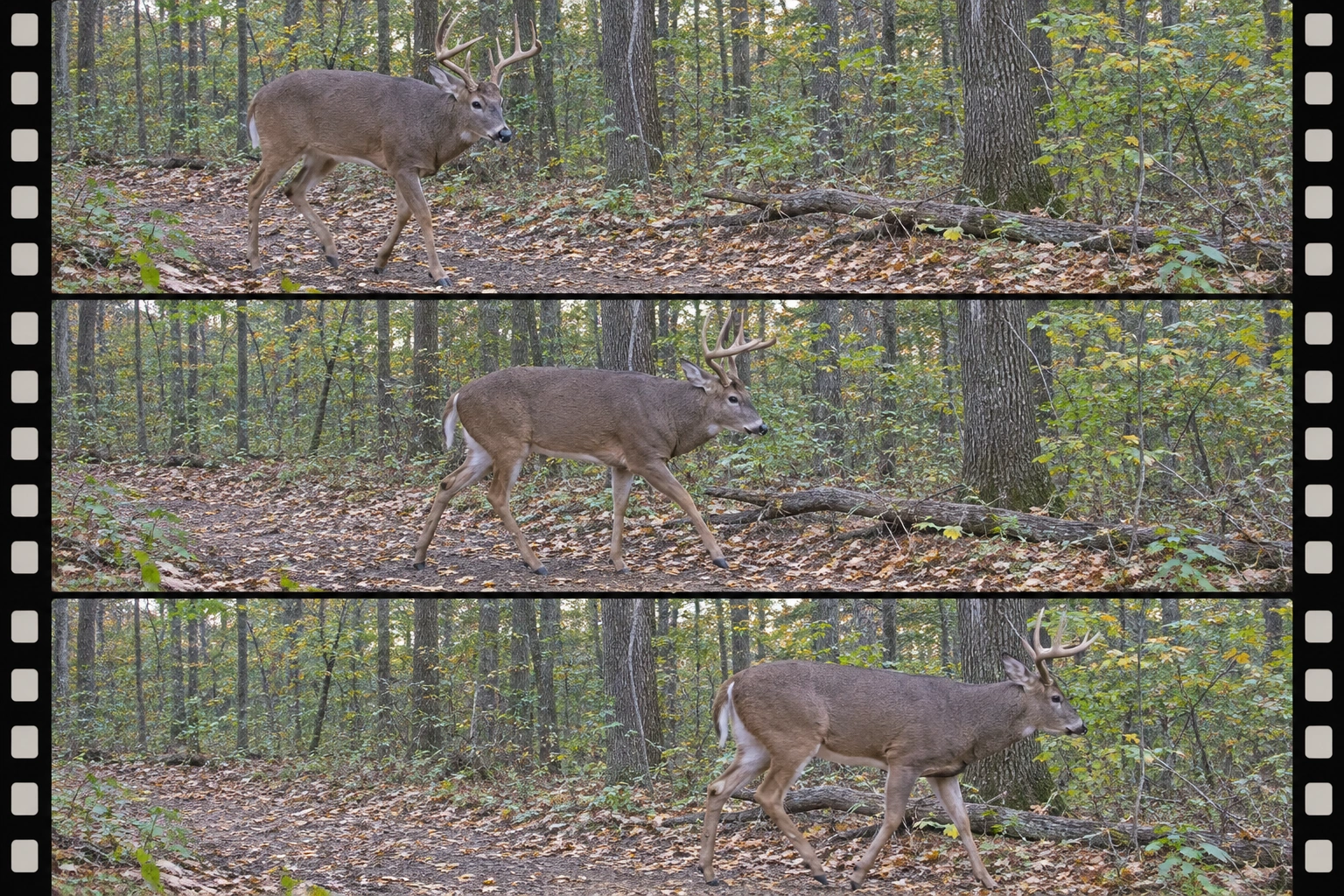
Burst Mode Explained
When an animal moves in front of your camera, the PIR sensor detects it and wakes the camera up. In single-shot mode, the camera takes one photo and then waits for the next trigger. In burst mode, it takes a quick series of photos, often less than a second apart, from that one trigger.
Burst helps because:
- Animals move. The first photo may catch only a nose or a tail. The second or third often shows the whole body.
- You see more angles. A buck turning his head gives you a better look at both sides of his rack.
- You catch more animals. Groups of deer often walk through one after another, and a burst can catch the ones behind the leader.
Burst is different from detection delay (also called trigger interval), which is how long the camera waits after a burst before it can be triggered again. Read what is detection delay on a trail camera for more.
1 vs 3 vs 5 Shots
- 1 shot: uses the least battery and storage. Best where deer stay in view for a long time, like feeders, food plots and mineral sites, combined with a longer delay.
- 3 shots: the sweet spot for most hunters. It gives you a short sequence without filling your card. Great for trails, funnels and scrapes.
- 5 shots or more: useful for buck ID and on fast-moving trails, but it fills the card and drains batteries faster. Sorting through the photos takes longer too.
How useful a burst is also depends on how fast your camera is. A camera with a quick trigger and short gap between burst shots captures more of the action. See how to set trigger speed on a trail camera.
Burst vs Video
- Burst photos are sharper than video frames, take less space, are quicker to look through, and use less battery. They are best for scouting, inventory and cellular cameras that send images.
- Video shows behavior: how a buck works a scrape, how deer react to each other, whether a deer is limping. It uses far more battery and storage, and night video can look grainy.
- Hybrid mode on many cameras takes a photo and then a short video for each trigger, so you get both. Learn more in our guide to trail camera hybrid mode.
Battery and SD Card Impact
Every extra shot adds up. Going from 1 to 3 shots per trigger roughly triples the number of photos on your card, and it uses more battery, especially at night when the IR flash fires for each shot.
- Watch your card size. High-resolution photos at 3 or 5 shots per trigger can fill a card quickly at a busy site. See how many photos a trail camera can store.
- Use lithium batteries if you run high burst settings, especially in cold weather.
- Cellular cameras: many only send the first photo of a burst to save data. Check your app’s settings.
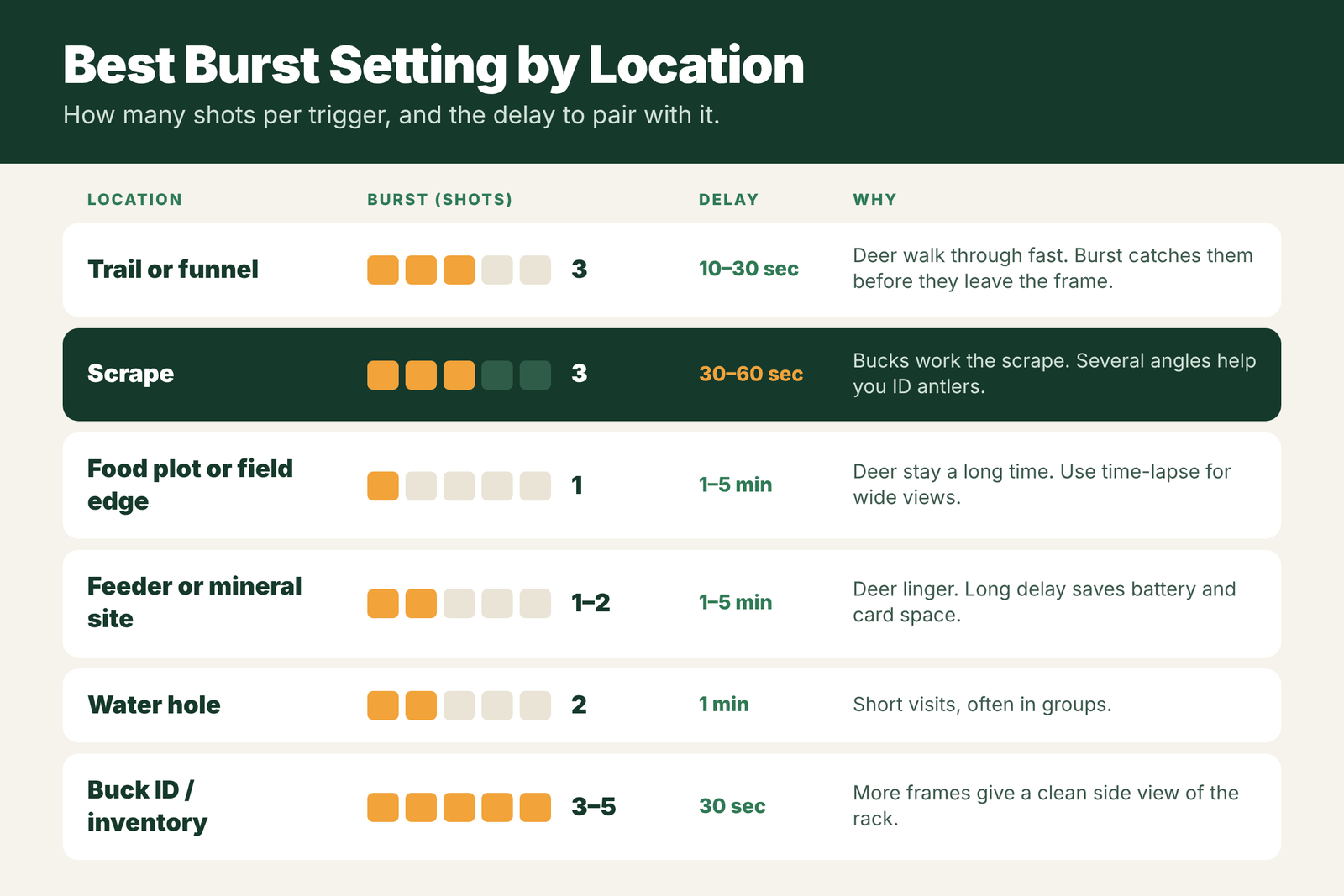
Best Burst Setting by Location
- Trail or funnel: 3 shots, 10 to 30 second delay.
- Scrape: 3 shots, 30 to 60 second delay.
- Food plot or field edge: 1 shot, 1 to 5 minute delay, or time-lapse for wide views.
- Feeder or mineral site: 1 to 2 shots, 1 to 5 minute delay.
- Water hole: 2 shots, about 1 minute delay.
- Buck ID or inventory: 3 to 5 shots, about 30 second delay.
These are starting points. If you see a lot of half-deer or empty frames, raise the burst. If your card or batteries run out too fast, lower it or lengthen the delay.
Burst and Delay: How They Work Together
Burst controls how many photos the camera takes each time it fires. Detection delay (also called trigger interval) controls how long it waits before it can fire again. Together, they decide how many photos you get per visit and how fast your card fills. Here is how common combinations play out.
| Burst | Delay | Photos per 10-minute visit (approx.) | Good for |
|---|---|---|---|
| 1 shot | 5 minutes | 2 to 3 | Feeders, mineral sites, cellular cameras |
| 2 shots | 1 minute | About 20 | Food plots, field edges |
| 3 shots | 30 seconds | About 60 | Trails and scrapes where deer pass quickly |
| 3 shots | 5 seconds | Over 100 | Rut funnels, when you do not want to miss a buck |
| 5 shots | 5 seconds | Hundreds | Short-term tests only; fills cards fast |
These numbers assume a deer stays in view for the whole 10 minutes. On a trail, a deer may only trigger the camera once or twice, so a short delay matters less there.
Step-by-Step: Choosing Your Burst Setting
- Ask how long deer stay in view. Passing through on a trail? Use 3 shots. Standing and feeding? Use 1 shot.
- Check your card size and battery. Small cards and alkaline batteries call for fewer shots.
- Consider your data plan on a cellular camera. Many send only the first photo of a burst, but some count every photo against your plan.
- Set the delay to match: short on trails, long at feeders.
- Check results after a week. If you see the same deer in 30 near-identical photos, lengthen the delay. If you see half a deer, raise the burst count or angle the camera along the trail.
Field Examples
The scrape camera: on 1 shot, a hunter only gets a photo of a buck’s back as he walks off. Switching to 3 shots shows him sniffing the licking branch, pawing the scrape and turning his head, which makes it easy to judge his rack.
The feeder camera: on 5 shots and a 10-second delay, a feeder camera fills a 32GB card in four days with photos of the same raccoons. Changing to 1 shot and a 5-minute delay cuts it to a few hundred photos a week while still showing every buck that visits.
The cellular camera: a hunter runs 3 shots on a cellular camera and burns through a monthly photo plan in ten days. Setting the camera to 1 shot with a 2-minute delay, or to send only the first image of each burst, stretches the plan through the month.
Mistakes With Burst Mode
- Max burst everywhere. It fills cards and drains batteries without giving you more useful photos at slow spots.
- Confusing burst with video. Burst gives sharp stills; video shows motion and sound. Pick the one that answers your question. See trail camera hybrid mode.
- Ignoring recovery time. After a burst, the camera needs time to save the photos before it can fire again. A slow camera may miss the second deer in a group. See trail camera recovery time.
- Forgetting night photos. At night, each shot fires the flash, which uses more power. Some cameras let you set fewer night shots.
Burst at Night
Night bursts are where photo burst really earns its keep. Night photos are more likely to be blurry because the camera uses a longer exposure in low light. With 3 shots, there is a good chance one of them catches the deer in a still moment, sharp enough to count points. If your camera has a fast-motion night mode, pair it with burst for the clearest night images of moving deer.
How Burst Affects Battery Life
Each photo uses a little power, and at night each photo fires the infrared flash, which uses much more. Going from 1 shot to 3 shots can roughly double or triple the power used per trigger at night, depending on the camera. On a quiet trail, the difference may hardly matter. At a busy feeder or field edge, it can cut battery life from months to weeks. If battery life is a problem, use 3 shots during the day and 1 at night if your camera allows separate settings, use lithium batteries, or add a solar panel or external battery. Watch the battery level on your next card check, and adjust before the camera dies in the middle of the rut.
Quick Recommendations
- Trails and funnels: 3 shots, 5 to 30 second delay
- Scrapes: 3 shots or hybrid, 30 second delay
- Feeders and mineral sites: 1 shot, 1 to 5 minute delay
- Food plots: 1 to 2 shots plus time-lapse at dawn and dusk
- Cellular cameras: 1 shot, or send only the first photo of a burst
Frequently Asked Questions
What is photo burst on a trail camera?
Photo burst, or multi-shot, makes the camera take several photos in a quick series each time it is triggered, usually 1 to 5, so you get more of the animal in view.
How many burst shots should I use?
3 shots is the best all-round setting. Use 1 shot at feeders and food plots where deer linger, and 3 to 5 shots for buck ID or fast trails.
Is burst mode better than video?
Burst photos are sharper, smaller and easier to review. Video shows behavior but uses much more battery and storage. Hybrid mode gives you both.
Does burst mode drain the battery?
Yes, more shots per trigger use more battery, especially at night when the IR flash fires for each photo. Lithium batteries help.
What is the difference between burst and detection delay?
Burst is how many photos the camera takes per trigger. Detection delay is how long it waits after that before it can trigger again.
Does burst mode count against my cellular plan?
It depends on the camera. Many send only the first photo of a burst, but some count every photo. Check your app settings.
What burst setting is best for a feeder?
Usually 1 shot with a longer delay, such as 1 to 5 minutes, so you do not get hundreds of nearly identical photos.
Why do I get blurry photos even with burst on?
Night photos use longer exposures, so moving deer can blur. Burst helps by giving you more chances, and a fast-motion night mode helps too.