
Verizon vs AT&T vs T-Mobile for Trail Cameras: Which Network Is Best?
When you buy a cellular trail camera, you are also choosing a cell network. Many models come in a Verizon version and an AT&T version, a few work on T-Mobile, and some newer cameras switch between networks on their own. Pick the wrong one for your land, and even the best camera will struggle to send photos. Here is how to choose between a Verizon, AT&T trail camera or T-Mobile option, and how to check which network really works at your stand.
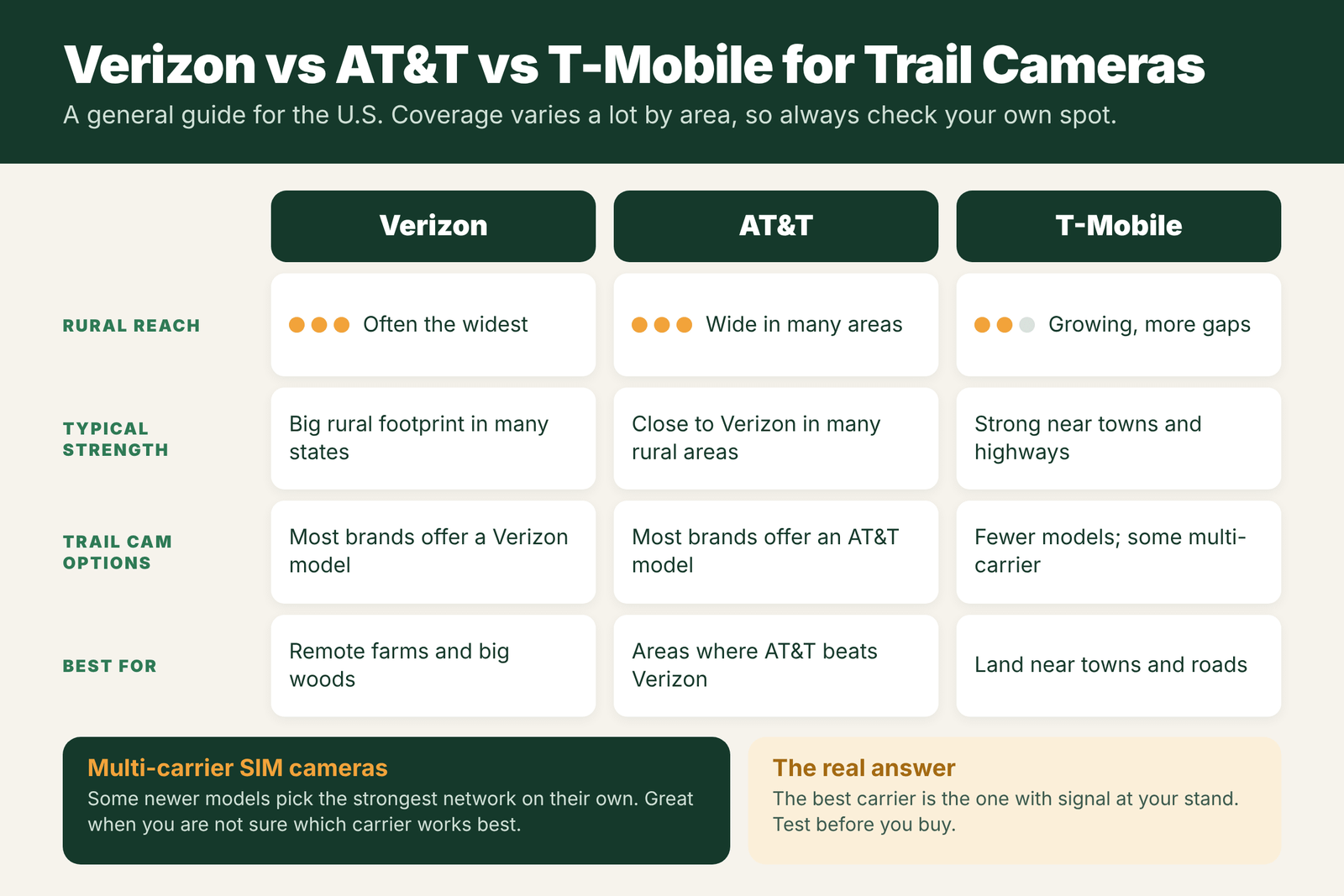
There is no single best carrier for trail cameras. The best one is the network with the strongest signal at your camera spot. In general, Verizon and AT&T have the widest rural coverage in the U.S., and most trail camera brands sell models for both. T-Mobile is often strong near towns and highways but can have more gaps in remote woods, and fewer cameras support it. Check coverage with your phone or a friend’s on each network at your stand, and if you are unsure, consider a multi-carrier camera that picks the strongest network on its own.
- Best carrier
- The one with signal at your stand
- Widest rural reach
- Often Verizon or AT&T
- T-Mobile
- Strong near towns, fewer cams
- Most brands offer
- Verizon and AT&T models
- Unsure?
- Multi-carrier SIM camera
- How to check
- Phone test at the spot
Why Carrier Matters More Than Brand
Trigger speed, photo quality and battery life all matter, but a cellular camera with no signal is just a regular camera with a monthly bill. Carrier coverage in the woods can change a lot within a mile, because of hills, valleys and tower locations. Two hunters a few miles apart can have opposite results with the same camera. That is why the first question is not “which brand?” but “which network works here?”
New to cellular cameras? See how a cellular trail camera works.
Checking Coverage at Your Stand
- Look at coverage maps from each carrier, but treat them as a rough guide. Maps are often more optimistic than real signal in the timber.
- Use real phones. Take your phone, and a friend’s or family member’s on other networks, to the exact spot and check bars and data speed.
- Check at camera height and on a couple of nearby trees. Signal can change in a few yards.
- Ask nearby hunters which network works on their cameras.
- Buy from a store with a good return policy, so you can switch carriers if the camera cannot connect.
Carriers Compared
- Verizon: often the widest rural coverage and a common default choice for remote farms and big woods. Most brands sell a Verizon model.
- AT&T: also strong in many rural areas, and in some places better than Verizon. Most brands sell an AT&T model too.
- T-Mobile: coverage has grown, and it is often strong near towns and highways, but remote areas can have more gaps. Fewer trail cameras offer a T-Mobile version, though some multi-carrier models can use it.
Coverage changes as networks grow, so recheck if you have not tested a spot in a while.
Brands by Carrier
Most big trail camera brands sell separate Verizon and AT&T versions of their cellular models, and some offer T-Mobile or multi-carrier versions. The model name or box usually shows the network. Check the exact model before you buy, since lineups change each year. Our guides list current picks:
Multi-Carrier SIM Cameras
Some newer cellular cameras use a SIM that can connect to more than one network and choose the strongest one at your spot. They are a great choice when:
- You are not sure which carrier works best on your land.
- You move cameras between properties with different coverage.
- You hunt in areas where every network is weak, and you want the camera to use whatever works.
Check which networks the camera can use, and whether the plan price is different from single-carrier models.
Our Recommendation
- Test signal at your stand on each network before you buy.
- Pick the carrier with the most bars there, aiming for about 2 bars or more.
- If two carriers are close, choose based on the camera you like best and plan price.
- If you cannot test, or hunt several properties, a multi-carrier camera is the safest pick.
- Improve placement before giving up on a spot. See trail camera antenna placement tips.
How to Test Each Carrier at Your Stand
- Start with the coverage maps for Verizon, AT&T and T-Mobile. Zoom in on your land, but treat the maps as optimistic.
- Borrow phones from friends or family on each carrier, or use a phone with dual SIM or eSIM so you can test more than one network.
- Walk to the exact camera spots, not just the parking area, and check the signal at about the height you plan to mount the camera.
- Try a real test: send a photo by text or upload one to the cloud. A phone that shows bars but cannot send data is a warning sign.
- Test more than once, at different times of day, and if you can, both with leaves on and off.
- Pick the carrier that works at your best spots, then choose a camera for that network.
Coverage vs Data Speed vs Plan Cost
| Factor | Why it matters | What to look for |
|---|---|---|
| Rural coverage | Your camera only works where there is signal | The carrier that reaches your exact spots |
| Network type | Older networks shut down; newer ones last longer | LTE or newer support on the camera |
| Upload reliability | Weak signal means failed or slow uploads | At least 2 bars at the camera height |
| Plan cost | Brand plans vary more by photo count than carrier | Compare photo limits and video options |
| Camera choice | Not every model comes in every carrier version | Check the brand offers your carrier |
On most big-brand cellular cameras, you buy a plan from the camera brand, not directly from the carrier, so the carrier mostly decides coverage, not price.
Field Examples
The family farm: Verizon shows full bars at the house, but at the back woodlot, AT&T is the only network with 2 bars. The hunter buys an AT&T camera for the woodlot and a Verizon camera for the field near the house.
The lease near a highway: T-Mobile has strong signal along the highway side of a lease, and the hunter’s phone already uses it. A T-Mobile-compatible camera works well there, but a second camera on the far ridge needs a different carrier.
The mountain unit: no carrier works in the main drainage. A multi-carrier camera finds one weak network on the ridge top, and standard SD cameras cover the rest.
Mistakes When Choosing a Carrier
- Picking your phone’s carrier by default. The best network at your house may be the worst at your stand.
- Trusting coverage maps alone. They are estimates. Test on the ground.
- Testing at the truck. Signal can drop sharply a few hundred yards into the woods or down a hill.
- Ignoring network sunsets. Older networks like 3G have been shut down. Buy a camera that supports current networks.
- Forgetting leaf-on season. A spot tested in winter may be weaker in summer.
When a Multi-Carrier Camera Makes Sense
If you hunt several properties in different areas, or one large property with patchy coverage, a multi-carrier or eSIM camera can save buying different models for each network. These cameras can connect to whichever supported network is strongest. They are not magic, since they still need some signal, but they give you more chances to find one. Check which networks each model supports, how it chooses between them, and how its plan is priced.
How Carrier Choice Affects Battery and Data
Carrier choice is not just about whether photos arrive. A camera on a strong network uploads quickly and goes back to sleep, which saves battery. A camera fighting for a weak signal on the wrong carrier keeps retrying, which drains batteries and can make uploads arrive hours late. Over a season, the difference can be dramatic: a camera on a strong network might run for months on a set of lithiums, while the same model on a weak network might need new batteries every few weeks. If you are deciding between two carriers with similar coverage on the map, the one with stronger signal at the exact camera spot will usually give you better battery life as well.
Data use is mostly set by the camera brand’s plan, not the carrier. Plans are usually priced by the number of photos per month, with extra cost for full-size photos or video. Busy spots like feeders can use up a plan fast. Longer delays, lower sensitivity and thumbnail uploads help. For plan prices and data details, see how much are cellular trail camera plans and how much data does a cellular trail camera use.
Frequently Asked Questions
Which carrier is best for a cellular trail camera?
The one with the strongest signal at your camera spot. Verizon and AT&T often have the widest rural coverage, but test at your stand before you buy.
Is AT&T or Verizon better for trail cameras?
It depends on your area. Both have wide rural coverage, and in some places AT&T is stronger while in others Verizon is. Check signal at your spot with phones on each network.
Are there trail cameras for T-Mobile?
Yes, but fewer models support T-Mobile than Verizon or AT&T. Some multi-carrier cameras can also connect to T-Mobile.
What is a multi-carrier trail camera?
It is a cellular camera with a SIM that can connect to more than one network and pick the strongest one where the camera is placed.
Can I switch my trail camera to another carrier?
Usually not on single-carrier models, since they are built and activated for one network. Check with the brand, or choose a multi-carrier model if you may need to switch.
Do I need a separate plan from Verizon or AT&T for my trail camera?
For most big-brand cameras, no. You buy the data plan through the camera brand’s app, and it uses the carrier network behind the scenes.
Which carrier has the best rural coverage?
It varies by area. Verizon and AT&T often have the widest rural coverage, but test at your exact spot before buying.
Can a trail camera work on 3G?
Most 3G networks in the US have been shut down, so 3G-only cameras no longer send photos. Buy a camera that supports LTE or newer.