
How to Cancel a Tactacam Reveal Subscription (Without Losing Photos)
When the season ends and the cameras come home, there is no reason to keep paying for a full data plan. Whether you want to stop paying completely or just cut back for the summer, it helps to know how your Reveal plan is billed before you start, because that decides where you cancel. Here is how to cancel a Tactacam Reveal subscription, what happens to your photos, and how to start again next season.
First, check where you pay. If you subscribed through the Apple App Store or Google Play, cancel in your phone’s subscription settings (iPhone: Settings → your name → Subscriptions; Android: Play Store → Payments & subscriptions). Otherwise, manage or cancel the plan in the REVEAL app or your Tactacam account, or contact Tactacam support. Cancel close to your renewal date, since unused data is usually not refunded. Download photos you want to keep first. If you still want some photos in the off-season, switching to a smaller plan can be a better choice than canceling.
- Apple billing
- Cancel in iPhone Subscriptions
- Google billing
- Cancel in Play Store
- Other billing
- REVEAL app, account or support
- Best timing
- Near the renewal date
- Refunds
- Unused data usually not refunded
- Option
- Downsize instead of cancel
Plan Types and Billing
Reveal cameras need a data plan to send photos to the app. Plans differ by how many photos you get and whether you pay monthly or yearly, and Tactacam also offers add-ons such as Xtra features. Prices and plan names change, so check Tactacam Reveal plans and Tactacam Reveal X monthly cost for current details. What matters for canceling is who bills you:
- Apple App Store: the charge shows as an Apple subscription.
- Google Play: the charge shows in your Google Play subscriptions.
- Directly through Tactacam: managed in the app or your Tactacam account.
Check your bank or card statement if you are not sure.
Cancel Steps
Billed through Apple (iPhone):
- Open Settings and tap your name.
- Tap Subscriptions.
- Choose the Tactacam REVEAL subscription and tap Cancel Subscription.
Billed through Google Play (Android):
- Open the Play Store and tap your profile picture.
- Tap Payments & subscriptions, then Subscriptions.
- Choose the REVEAL subscription and tap Cancel subscription.
Billed directly: open the REVEAL app, go to the camera’s plan or your account settings, and follow the options to change or cancel the plan. If you do not see a cancel option, contact Tactacam support. Menu names can change between app versions.
Downsizing vs Canceling
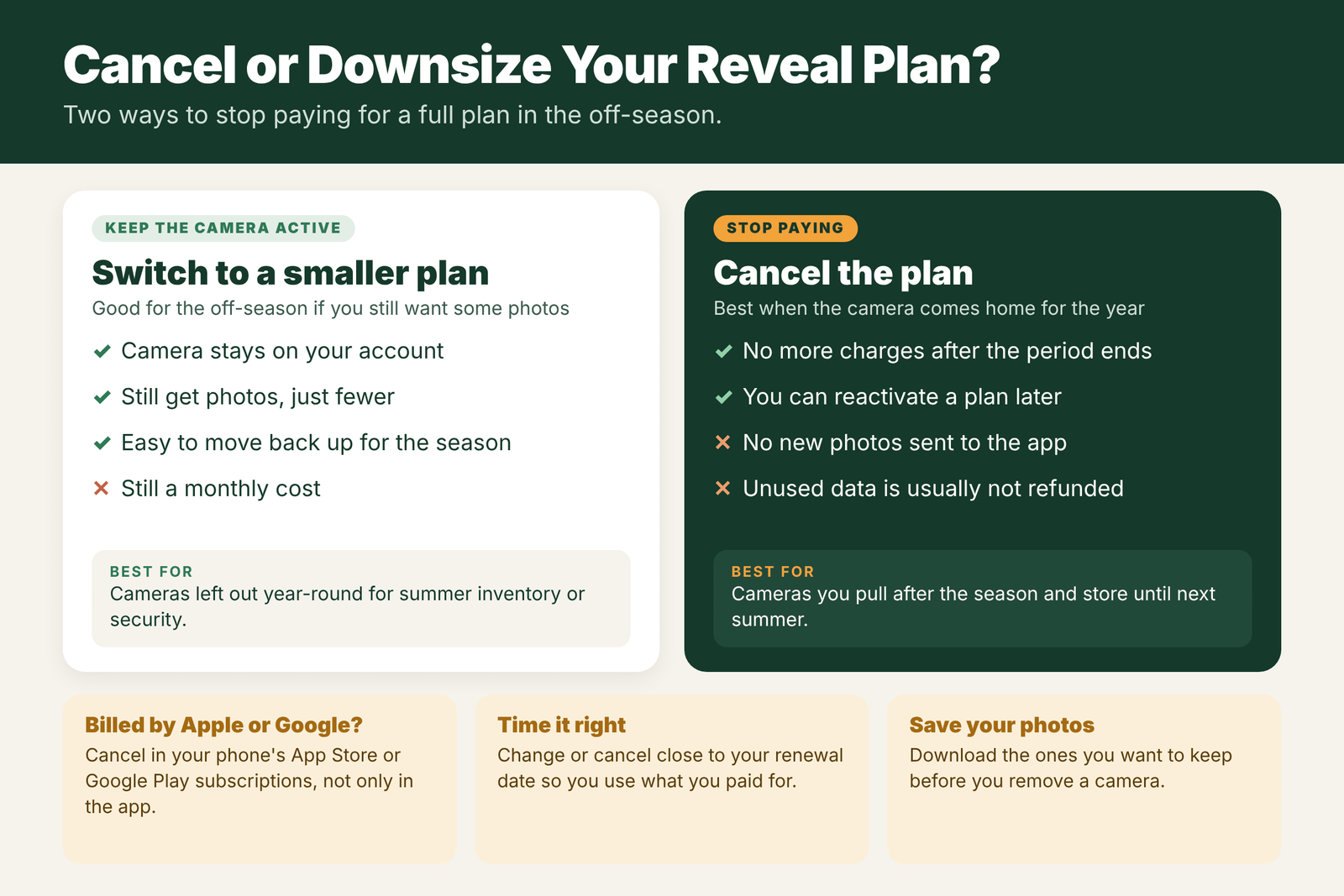
- Switch to a smaller plan if you leave a camera out in summer for inventory or security. The camera stays on your account and still sends some photos.
- Cancel if the camera comes home and sits in a drawer until next season.
- Timing: Tactacam advises making plan changes close to your billing date, since unused data from the old plan is not refunded.
What Happens to Your Photos
- The camera stops sending new photos once the plan ends.
- Photos still save to the SD card if the camera is on.
- Photos already in the app may stay available for a time, but do not count on it. Download the ones you want to keep before canceling or removing a camera.
Reactivating Later
- Put fresh batteries and an SD card in the camera.
- Open the REVEAL app and choose a plan for the camera.
- Turn the camera on near good signal and wait for it to check in.
- Update the app and firmware if prompted.
Full steps: how to reactivate a Tactacam Reveal.
Find Out How You Are Billed
Most cancel problems come from looking in the wrong place. A subscription bought through an app store can only be cancelled through that store, and deleting the app does not stop the charge. Use this table to find the right place:
| How the charge appears | Billed by | Where to cancel |
|---|---|---|
| Apple or APPLE.COM/BILL on your statement | Apple App Store | iPhone Settings, your name, Subscriptions |
| Google or Google Play on your statement | Google Play | Play Store, profile, Payments and subscriptions |
| Tactacam or similar on your statement | Tactacam directly | REVEAL app account or plan settings, or Tactacam support |
| Not sure | Check your email receipts | Search your inbox for the receipt and check who sent it |
If you have more than one camera, check each camera’s plan. They can be on different billing methods, especially if you bought them in different years or on different phones.
Before You Cancel: A Short Checklist
- Download the photos you want to keep. Save the best buck photos and anything you need for scouting records to your phone or computer.
- Note your renewal date. Cancelling near the end of the billing period gets the most use from what you already paid.
- Write down each camera’s name and ID so you can find them easily when you reactivate.
- Decide what happens to the camera. Bring it home, or leave it out on a smaller plan.
- Remove shared users if you are done with a lease or partner arrangement.
- Take a screenshot of the cancel confirmation for your records.
Off-Season Options Compared
| Option | Camera keeps sending photos | Monthly cost | Best for |
|---|---|---|---|
| Keep full plan | Yes, full allowance | Highest | Year-round scouting or security |
| Switch to smaller plan | Yes, fewer photos | Lower | Summer inventory, property watch |
| Cancel and bring camera home | No | None | Camera not needed until fall |
| Cancel, leave camera on SD card only | No, saves to card | None | Remote spot you will visit anyway |
Plan names, prices and photo limits change, so check current options in the app or on Tactacam Reveal plans. If cost is the main concern, see Tactacam Reveal X monthly cost to compare what you pay across the year.
Storing a Camera After You Cancel
- Take out the batteries. Leaving them in for months can lead to leaks and corroded contacts.
- Back up and format the SD card, or store it in a labeled case.
- Dry the camera fully before putting it away, with the battery door open for a day.
- Keep the strap, mount and any solar panel together so setup is quick next fall.
- Store indoors away from heat, such as a closet, not a hot shed or truck.
Common Cancel Problems
- Still charged after deleting the app: deleting the app does not cancel a subscription. Cancel in the store or account where you pay.
- No cancel option in the app: the plan may be billed through Apple or Google, or the menu may have moved in a new app version. Check the store first, then contact Tactacam support.
- Charged for a camera you forgot about: look at the plan list for every camera on your account, not just the one you use most.
- Cancelled but the camera still shows active: plans often stay active until the end of the current billing period.
- Annual plan renewing unexpectedly: set a phone reminder a week before the renewal date each year.
Field Example
A hunter runs two Reveals. One watches a gate where trespassers have been a problem, the other sits on a fall scrape line. After the season, they keep the gate camera on the smallest plan and cancel the scrape camera’s plan a few days before it renews. They pull the scrape camera, take out the batteries and store it. In late August they put in fresh lithium batteries, pick a plan in the app and hang it again. Total cost through the summer is a fraction of running both cameras on full plans.
If You Were Charged After Cancelling
First check the date of the charge against the date on your cancel confirmation. A charge from before you cancelled, or a renewal that went through the same day, is the most common reason. If the charge came after the plan should have ended, gather your confirmation screenshot, the receipt and the camera ID. For Apple or Google billing, you can request a refund through the store’s own refund process, and the store decides. For direct billing, contact Tactacam support with the same details. Refund rules vary and unused data is usually not refunded, so the best protection is cancelling a few days before renewal and keeping a record of it.
Frequently Asked Questions
How do I cancel my Tactacam Reveal plan?
If you pay through Apple or Google, cancel in your phone’s subscription settings. Otherwise, change or cancel the plan in the REVEAL app or contact Tactacam support.
Do I get a refund when I cancel a Reveal plan?
Usually not for unused data. Cancel or change your plan close to the renewal date to get the most from what you paid.
Can I pause my Tactacam Reveal subscription?
Check the app for current options. A common approach is to switch to a smaller plan for the off-season, or cancel and reactivate before the next season.
Will I lose my photos if I cancel?
New photos stop sending to the app. Download any photos you want to keep before you cancel or remove the camera.
How do I reactivate my Reveal after canceling?
Pick a new plan for the camera in the REVEAL app, then turn the camera on near good signal and let it check in.
Does deleting the REVEAL app cancel my subscription?
No. Deleting the app does not stop billing. Cancel through Apple, Google Play or your Tactacam account, depending on how you pay.
Why can’t I find a cancel button in the REVEAL app?
Your plan may be billed through Apple or Google, which means you cancel in your phone’s store settings. If you pay Tactacam directly and still cannot find it, contact support.
Does my plan stop the moment I cancel?
Usually it stays active until the end of the current billing period, then stops. Check your confirmation or the plan page in the app for the exact date.