Tactacam Reveal Plans give cloud storage, live view, and tiered features for hunters and content creators.
I’ve tested Tactacam gear and worked with trail cameras for years. This guide breaks down Tactacam Reveal Plans in simple terms, explains what each plan does, and shows how to pick the right plan for your needs. For a model-by-model breakdown, see our Tactacam Reveal comparison chart. You will get clear comparisons, setup tips, real-life lessons, and practical advice to use Tactacam Reveal Plans well.
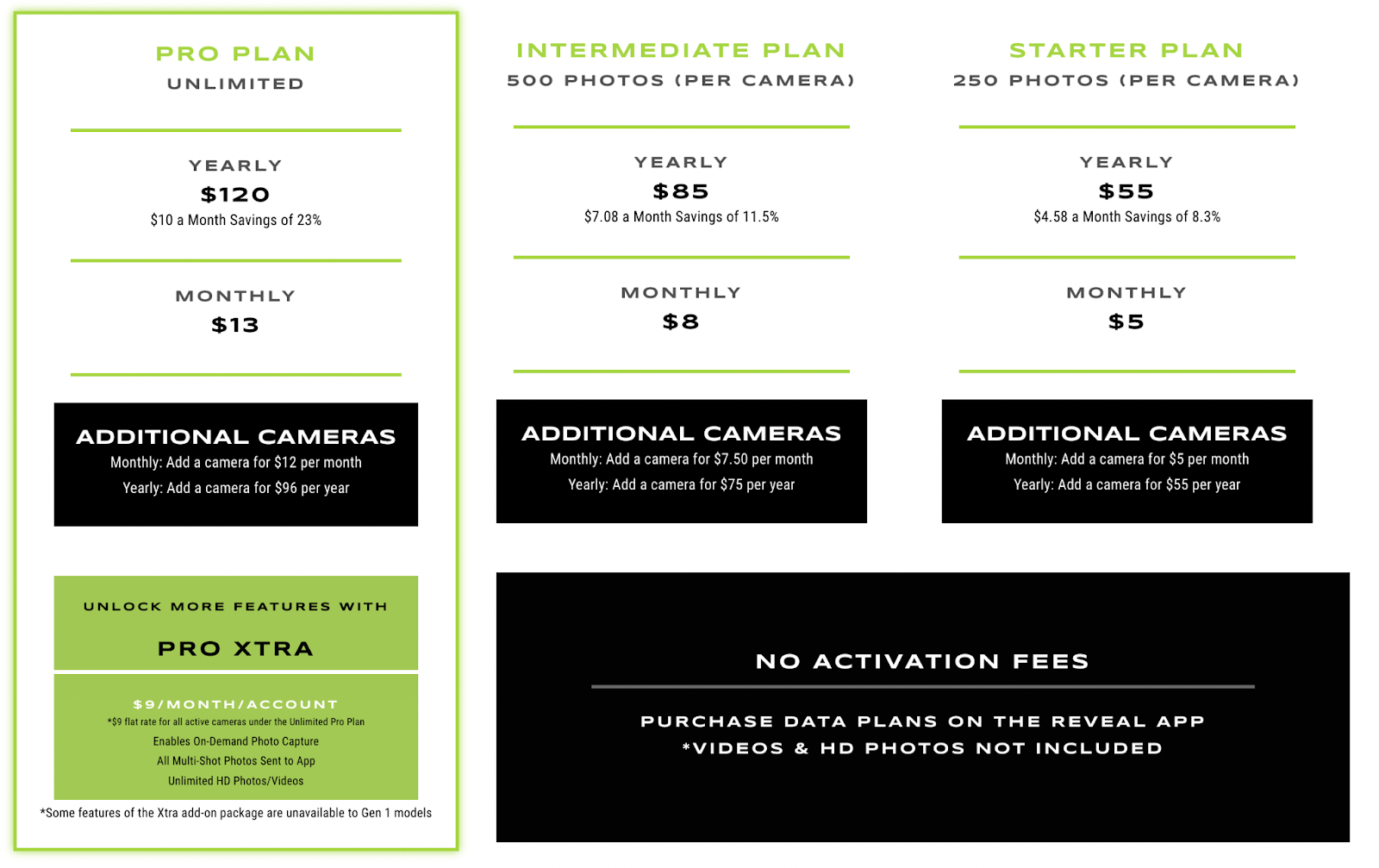
Overview of Tactacam Reveal Plans
Tactacam Reveal Plans are subscription options that add cloud services and advanced features to Tactacam Reveal cameras. Each plan layers features such as cloud video storage, live view, faster uploads, and priority support. The plans let you choose pay-as-you-go flexibility or longer-term savings. Knowing what each plan includes helps avoid paying for features you do not need.

Key features included in most Tactacam Reveal Plans
Here are the common features you will see across Tactacam Reveal Plans. These are the items that change by tier and matter most in daily use.
- Cloud video storage for recorded clips and photos to access from your phone or web.
- Live view or near-live streaming so you can check your camera feed remotely.
- Faster upload windows and higher quality video retention on higher tiers.
- Multi-camera management in the app so you can control more than one camera under one account.
- Priority customer support and firmware updates for top plans.
These features affect battery use, data needs, and how often you must visit a camera in the field. Choose based on how you hunt, scout, or create content.

Plan tiers and pricing patterns
Tactacam Reveal Plans typically come in multiple tiers, often labeled as basic, plus, and pro in similar product families. Each higher tier gives more cloud days, higher video resolution retention, and faster upload windows. Monthly and annual payment options are common, with annual plans offering lower monthly cost. Expect price changes over time, so check current plan terms before subscribing.
When comparing tiers, focus on:
- Number of days cloud video is stored
- Maximum video length and resolution stored in the cloud
- Number of cameras supported per account
- Whether live view is included or limited
Planning for data usage and battery life helps avoid hidden costs and surprises when using Tactacam Reveal Plans.

How to choose the right Tactacam Reveal Plans for your needs
Use a simple decision process when picking a plan. Start by asking what you need most: live view, long cloud storage, or multi-camera support.
- If you want occasional backups and low cost, pick an entry-level plan with short cloud retention.
- If you rely on remote scouting and frequent live checks, choose a plan with live view and faster uploads.
- If you manage multiple cameras or create content, pick a higher tier with unlimited or extended storage and more camera slots.
Also consider cell coverage at your sites, battery strategy, and how often you retrieve footage. A plan that matches your field routine is the best value.

Setup and activation guide for Tactacam Reveal Plans
Activating a Tactacam Reveal Plans subscription is usually done through the app or the account portal. The steps are straightforward.
- Create or sign into your Tactacam account in the app.
- Register your Reveal camera using the camera ID or QR code.
- Choose your preferred Tactacam Reveal Plans tier and payment frequency.
- Apply the plan to the camera and verify cloud sync and live view.
After activation, test the camera near a good signal area to confirm uploads and live feed. If uploads are slow, try reducing video length or changing resolution settings.

Real-life tips and lessons from using Tactacam Reveal Plans
I have used Tactacam devices across seasons. These are the lessons I learned that save time and money.
- Match plan length to your hunting cycle. Switch plans by season if needed to save money.
- Test live view before you rely on it in a low-signal area. Live view needs consistent cell service.
- Limit continuous recording. Use motion triggers to save battery and cloud space.
- Keep a spare battery or solar option if you use high-tier plans with frequent uploads.
- Document which camera is on which plan so you do not overpay or lose footage.
These tips helped me avoid dead batteries in cold weather and unnecessary subscription costs. They work for casual users and content creators alike.

Comparing Tactacam Reveal Plans with other camera plan options
It helps to compare Tactacam Reveal Plans with other camera cloud plans before committing. Key comparison points include storage length, upload speed, live view quality, and per-camera cost.
- Some competitors offer unlimited storage at lower resolution; Tactacam plans may focus on high-quality clips and live view.
- Others charge per camera; check whether Tactacam Reveal Plans bundle cameras or charge each separately.
- Support and firmware updates differ; higher-tier plans often get priority updates and fixes.
Make a short pros and cons list based on your priorities. For many users, the best choice balances storage, live access, and cost.
Frequently Asked Questions of Tactacam Reveal Plans
What do Tactacam Reveal Plans include?
Tactacam Reveal Plans include cloud storage, live view, and tier-based features like longer retention and multi-camera support. Features vary by plan, so check the plan details in the app before subscribing.
Can I change my Tactacam Reveal Plans later?
Yes, you can usually upgrade or downgrade plans through your account or the app. Be aware of billing cycles and any prorated charges when you change plans.
Will Tactacam Reveal Plans affect battery life?
Using cloud upload and live view increases battery use compared to local-only recording. To conserve power, reduce upload frequency, lower video length, or use motion triggers.
Do Tactacam Reveal Plans work without cell service?
Most plan features need cell coverage to send clips to the cloud and enable live view. Cameras will still record locally if there is no cell signal and upload later when connected.
Is my video safe on Tactacam Reveal Plans cloud?
Cloud storage from reputable services is typically secure, but no system is perfect. Use strong account passwords and keep firmware updated for the best protection.
Can I use one Tactacam Reveal Plans subscription for multiple cameras?
Some plan tiers support multiple cameras, but limits vary. Check the plan specifications to see how many cameras a single subscription can cover.
Are there free trials for Tactacam Reveal Plans?
Occasionally, free trials or promotional periods are offered to test plan features. Check the app or official offers to see current trial availability.
Conclusion
Tactacam Reveal Plans add cloud backup, live access, and advanced features to Reveal cameras. Choose a plan by matching storage time, live view needs, and the number of cameras to your routine. Start small if you are unsure, then upgrade when you need more storage or faster uploads. Try a seasonal approach to save money and test live view in real field conditions. If this guide helped, consider subscribing, leaving a comment, or sharing your own Tactacam Reveal Plans experience to help others learn.
As an Amazon Associate, I earn from Qualifying Purchases.