
Why Does My Tactacam Reveal Only Flash Green? (Lights Explained)
You turn on your Tactacam Reveal, and instead of starting up normally, a green light just keeps flashing. The screen may stay blank, and the camera never seems to finish booting. It is a common problem, and Tactacam’s own support notes point to a likely cause. Here is what the Reveal status lights usually mean, why your Tactacam Reveal only flashes green, and how to fix it.
On several Reveal models, a green light that keeps flashing and never settles usually means the camera is stuck on a software or firmware error: it is trying to start but cannot finish. Weak or low-voltage batteries can also cause it. Try fresh lithium batteries (or a charged battery pack), power on without the SD card, then update the firmware with enough battery. If it still flashes green, contact Tactacam support, since some cameras need a firmware reflash by their technicians. Note that a short blink while a test photo sends is normal.
- Nonstop green flash
- Software or firmware issue
- Also check
- Battery voltage
- First try
- Fresh lithium, no SD card
- Then
- Update firmware
- Short blink on test
- Normal, photo sending
- Still flashing
- Contact Tactacam support
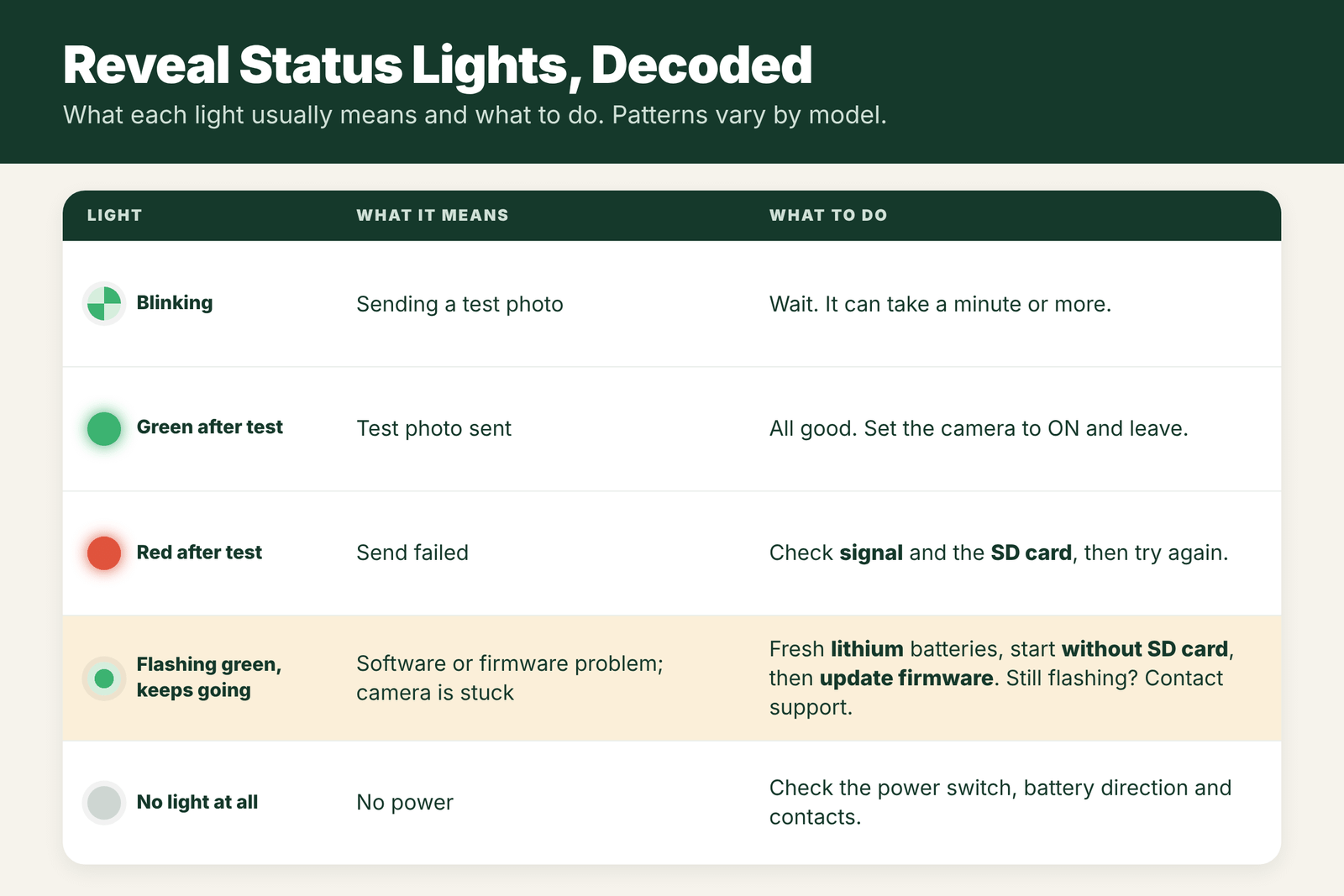
Reveal Status Light Guide
Light patterns differ between Reveal models (original Reveal, Reveal X, X-Pro, 2.0 and newer), so always check your manual. As a general guide:
- Blinking during a test photo: the camera is sending. Wait for it to finish.
- Green after a test photo: the photo sent successfully.
- Red after a test photo: the send failed, most often because of weak signal or an SD card problem.
- Green that keeps flashing and never settles: the camera is stuck during start-up, often a firmware or power issue.
- No light at all: no power. Check the switch, battery direction and contacts.
Why It Only Flashes Green
- Firmware or software error: Tactacam’s support notes for models like the Reveal 2.0 and X-Pro describe a flashing green status light as the camera running into an internal error while starting up.
- Low or unstable power: weak alkaline batteries, mixed old and new batteries, or cold weather can drop voltage enough that the camera cannot boot.
- SD card problem: a damaged, unsupported or badly formatted card can hang the start-up.
- Interrupted update: if the camera lost power during a firmware update, it may not start normally.
Fixes Step by Step
- Swap the power. Put in a full set of fresh lithium AA batteries, or a fully charged Tactacam battery pack if your model uses one. Do not mix old and new.
- Remove the SD card and turn the camera on. If it starts normally, the card is the problem. Format it in the camera, or try a new card.
- Power cycle. Turn the camera off, remove the batteries for a few minutes, then try again.
- Update the firmware. Make sure the battery is well charged first (Tactacam recommends around 40 to 50 percent or more), then follow the update steps for your model. See how to update a Tactacam Reveal.
- Factory reset if the camera starts but still acts strangely. See how to reset a Tactacam Reveal X.
When to Contact Support
- The green light keeps flashing after fresh batteries, no SD card and a power cycle.
- The screen stays blank on a model that has a screen.
- A firmware update fails or will not start.
Tactacam says some cameras in this state need a firmware reflash done by their service team. Have your camera model, serial number and what you have already tried ready. If the camera starts but will not connect, see Tactacam Reveal not checking in. For more on the camera line, see our Tactacam Reveal guide.
Quick Diagnosis Table
Use what happens during each test to narrow down the cause. This is a general guide. Light behavior varies by Reveal model and firmware version, so check your manual or the Tactacam help pages for your exact model.
| Test | Result | What it points to |
|---|---|---|
| Fresh lithium batteries | Camera boots normally | Old batteries or low voltage |
| Fresh lithium batteries | Still flashes green | Card, firmware or hardware |
| No SD card, fresh batteries | Camera boots normally | SD card is the problem |
| No SD card, fresh batteries | Still flashes green | Firmware or hardware |
| Different, freshly formatted card | Camera boots normally | Old card was corrupt or unsupported |
| Camera warmed indoors overnight | Boots normally | Cold weather and battery voltage |
| Firmware update completes | Boots normally | Software error fixed |
| Firmware update fails or will not start | Still flashes | Likely needs Tactacam service |
Doing the Tests at Home, Not in the Woods
If you can, bring the camera home before you start testing. It is much easier to work through the steps at a table with good light, spare batteries and a strong Wi-Fi or cell signal for your phone. It also takes cold weather out of the picture, since a camera that has been sitting in freezing temperatures can behave differently once it warms up.
- Let the camera warm to room temperature for a few hours if it came in from the cold. Open the case so any moisture can dry.
- Inspect the battery tray. Look for bent springs, corrosion or a leaked battery. Clean light corrosion gently with a dry cloth or a pencil eraser. If there is heavy corrosion, contact support.
- Load a full set of new lithium AA batteries from the same pack, all facing the right way.
- Start with no SD card. Watch the light for a couple of minutes. Note whether it settles, keeps flashing, or turns another color.
- Add a known good card that you formatted, ideally one that is a size and speed your manual lists as supported.
- Take a test photo once it starts and watch for the send result.
- Write down what you saw at each step. If you end up contacting support, this list saves time.
Batteries, Voltage and Cold
Many start-up problems on cellular cameras come down to voltage, not the camera itself. Alkaline AA batteries lose voltage quickly as they drain and in the cold. A set that still shows some charge in a TV remote may not have enough to power a cellular radio at start-up, which pulls a burst of current. Lithium AA batteries hold their voltage better until they are nearly empty and handle cold much better, which is why most cellular camera makers recommend them.
| Power source | Cold weather | Notes |
|---|---|---|
| Alkaline AA | Poor | Voltage drops as they drain and in the cold |
| Lithium AA | Good | Steady voltage, better in freezing temperatures |
| Rechargeable NiMH AA | Mixed | Lower voltage per cell; check your manual before using |
| Tactacam battery pack (if your model uses one) | Varies | Charge fully before testing |
| Solar panel | Helps over time | Keeps batteries topped up, will not fix a dead set right away |
About Firmware Updates
A firmware update replaces the software the camera runs on. If power cuts out partway through, the camera can be left with incomplete software and may not start properly. To avoid this:
- Start an update only with fresh batteries or a well charged battery pack.
- Keep the camera in a spot with strong, steady signal if the update arrives over cellular.
- Do not turn the camera off or pull the batteries during the update, even if it seems to take a while.
- Follow the update steps for your exact model, since methods differ between Reveal versions.
Mistakes to Avoid
- Mixing battery types or ages. One weak cell can drag down the whole set.
- Testing in the cold and blaming the camera when it is really the batteries.
- Skipping the no-card test. It is the fastest way to rule out the SD card.
- Repeating a failed firmware update over and over on low power. Charge up first, and contact support if it keeps failing.
- Opening the camera body beyond the battery and card doors. That can void the warranty.
Field Example
A hunter pulls a Reveal off a ridge stand in late November after it stops sending photos. At the truck, the green light flashes and never settles. At home they let it warm up overnight, put in a new set of lithium batteries and start it with no SD card. It boots normally. With the old card back in, the flashing returns. A new, freshly formatted card fixes it. The whole fix took ten minutes once the camera was warm, and it never needed a reset or a support ticket. The lesson is to test one thing at a time, in order, so you know exactly which part was at fault.
Frequently Asked Questions
Why does my Tactacam Reveal keep flashing green?
A green light that keeps flashing and never settles usually means the camera is stuck on a software or firmware error during start-up. Low battery voltage can also cause it.
What does a red light mean on a Tactacam Reveal?
After a test photo, a red light usually means the photo failed to send, most often because of weak signal or an SD card problem.
How do I fix a Tactacam Reveal flashing green?
Put in fresh lithium batteries, start the camera without the SD card, power cycle it, and update the firmware. If it still flashes, contact Tactacam support.
Is a blinking green light normal on a Reveal?
A short blink while a test photo is sending is normal. A green light that flashes nonstop and the camera never finishes starting is not.
Can a bad SD card cause a Tactacam Reveal to flash green?
It can. Start the camera without the card. If it boots normally, format the card in the camera or replace it.
Can cold weather cause a Tactacam Reveal to flash green?
It can, mostly by lowering battery voltage. Bring the camera indoors to warm up, then test with fresh lithium batteries.
Can I use rechargeable batteries in a Tactacam Reveal?
Check your model’s manual. Rechargeable NiMH cells have a lower voltage than lithium AA and may cause start-up problems on some cameras.
Is a Tactacam Reveal that only flashes green covered by warranty?
It may be, depending on the age of the camera and the cause. Contact Tactacam support with your model and serial number to check.