
How to Cancel a Moultrie Mobile Subscription (Step by Step)
Season over, cameras pulled, and the plan is still charging every month? Canceling a Moultrie Mobile plan takes a couple of minutes once you know where to look. The main thing to check first is who bills you, because a plan bought through Apple has to be canceled through Apple. Here is how to cancel a Moultrie Mobile subscription, what happens to your photos, and how to save money without canceling.
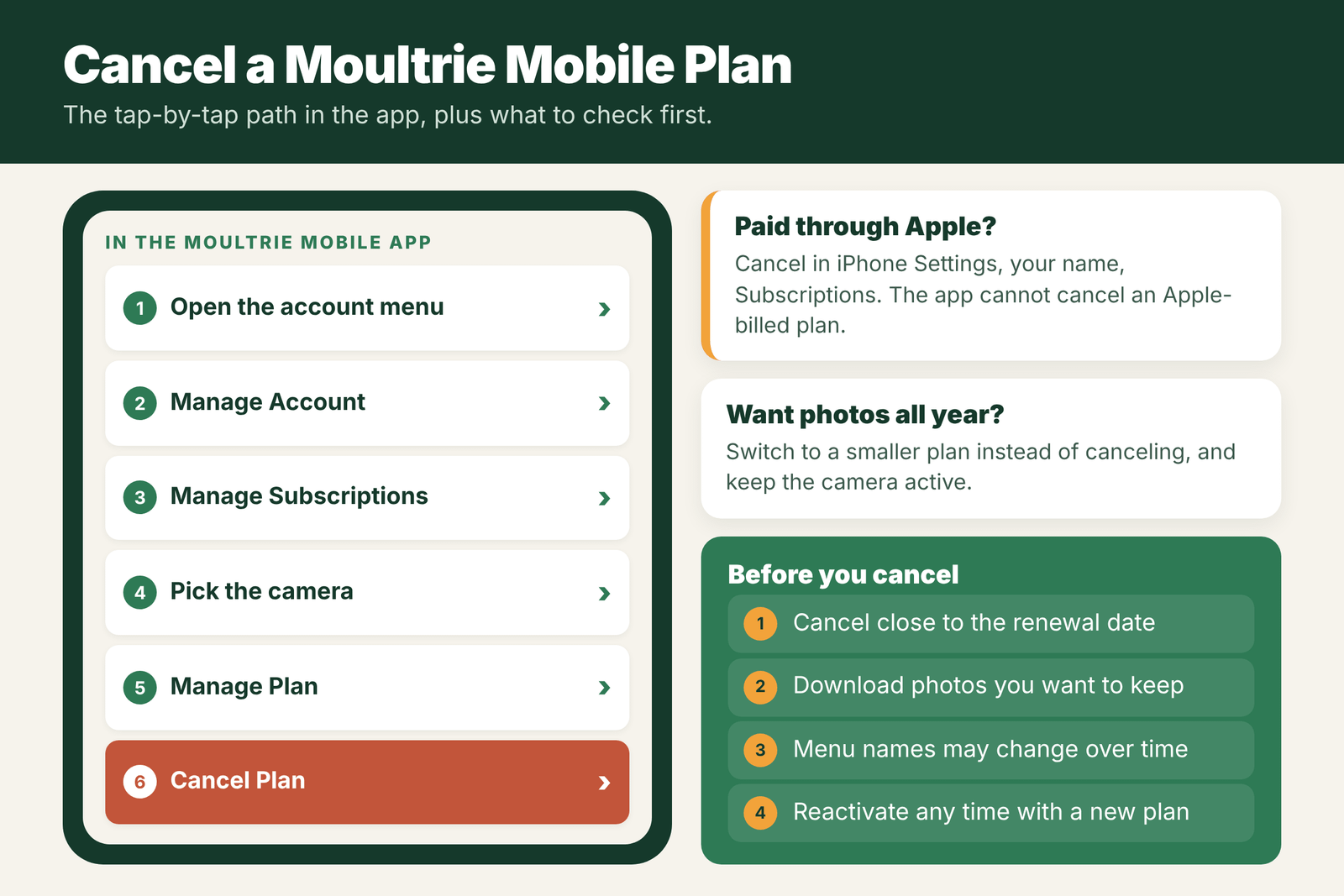
In the Moultrie Mobile app, open the account menu, go to Manage Account, then Manage Subscriptions, pick the camera, tap Manage Plan, and choose Cancel Plan. If you subscribed through the Apple App Store, cancel in your iPhone’s Settings → your name → Subscriptions instead. Cancel close to your renewal date, and download any photos you want to keep. If you want some photos over the summer, a smaller plan may suit you better than canceling.
- Where
- Moultrie Mobile app, Manage Subscriptions
- Apple billing
- Cancel in iPhone Subscriptions
- Best timing
- Near the renewal date
- Photos
- Download keepers first
- Cheaper option
- Switch to a smaller plan
- Restart
- Pick a new plan any time
Check How You Are Billed
- Through Moultrie: the charge shows as Moultrie or Moultrie Mobile on your card. Cancel in the app or on the Moultrie Mobile website.
- Through Apple: the charge shows as an Apple or App Store subscription. Cancel through your iPhone’s subscription settings.
Not sure? Look at your card statement, or check your iPhone’s Subscriptions list for Moultrie Mobile. For plan details and prices, see Moultrie Mobile plans.
Cancel Steps in the App
- Open the Moultrie Mobile app and sign in.
- Open the account menu.
- Tap Manage Account, then Manage Subscriptions.
- Choose the camera whose plan you want to end.
- Tap Manage Plan, then Cancel Plan, and confirm.
Menu names can change between app versions. If you do not see these options, use the Moultrie Mobile website or contact Moultrie support.
Cancel an Apple-Billed Plan
- Open Settings on your iPhone and tap your name.
- Tap Subscriptions.
- Choose Moultrie Mobile and tap Cancel Subscription.
Timing, Refunds and Photos
- Timing: cancel close to your renewal date. The plan usually runs until the end of the period you paid for.
- Refunds: do not expect a refund for unused time or photos. Check Moultrie’s current terms if you need one.
- Photos: the camera stops sending new photos once the plan ends. Moultrie says photos stay on your account after canceling, but download any you cannot lose to be safe.
Cancel or Downsize?
- Downsize if you leave a camera out in summer for food plots, trespassers or inventory. A smaller plan keeps the camera working for less.
- Cancel if the camera comes home and sits on a shelf until next season.
Comparing options? See what is the cheapest trail camera plan, or read what is Moultrie Mobile for how the system works.
Restarting Next Season
- Put fresh batteries in the camera.
- Open the app, pick the camera and choose a new plan.
- Turn the camera on in good signal and wait for it to connect.
- Update the app and camera firmware if asked.
Before You Cancel: What to Do First
- Download the photos you care about. Even though Moultrie says photos stay on your account, saving your best buck photos and scouting records to your phone or computer is cheap insurance.
- Find your renewal date in the subscription details. Cancelling a few days before it gives you the most use from what you paid.
- List every camera on the account and note which plan each one is on. People often cancel one camera and forget another.
- Check how each camera is billed. Cameras added at different times, or on a different phone, can be on different billing methods.
- Decide where each camera goes: home on a shelf, or left out on a smaller plan.
- Screenshot the confirmation after you cancel, with the date showing.
Off-Season Options Compared
| Option | Camera sends photos? | Ongoing cost | Good for |
|---|---|---|---|
| Keep current plan | Yes | Full price | Year-round scouting or security |
| Switch to a smaller plan | Yes, fewer photos | Lower | Summer inventory, gate or cabin watch |
| Cancel and bring camera home | No | None | Camera not needed until late summer |
| Cancel, leave camera saving to SD card | No, saves locally on models that support it | None | Spots you visit anyway |
Plan names, prices and photo limits change, so check the current list on Moultrie Mobile plans before deciding.
Cancelling on Android or the Website
Android users who subscribed in the app are usually billed by Moultrie directly, not by Google, but it is worth checking. Open the Play Store, tap your profile picture, then Payments and subscriptions, then Subscriptions. If Moultrie Mobile appears there, cancel it in the Play Store. If it does not, cancel in the Moultrie Mobile app as described above, or sign in on the Moultrie Mobile website and look for the account or subscription section. Menu names change between app and website versions, so if the option is not where you expect, Moultrie support can cancel or confirm for you.
Storing the Camera After You Cancel
- Remove the batteries. AA batteries left in all summer can leak and corrode the contacts.
- Charge external battery packs partway and store them in a cool, dry place, then top them off before the season.
- Back up and format the SD card, or store it in a labeled case.
- Dry and clean the camera with the cover open for a day. Wipe the lens and check the seal for dirt.
- Keep straps, mounts and solar panels together so setup goes fast in the fall.
Common Cancel Problems
- Deleted the app but still charged: deleting the app never cancels a plan. Cancel in the app, on the website or through Apple.
- No Cancel Plan option: the plan may be billed through Apple. Check your iPhone Subscriptions first.
- Charged for a camera you forgot: check Manage Subscriptions for every camera on your account.
- Plan still shows active after cancelling: plans usually stay active until the end of the period you paid for. Check the end date shown.
- Charged after the end date: gather your confirmation screenshot and receipt and contact Moultrie support, or Apple if Apple billed you.
Field Example
A hunter has three Edge cameras. After the late season they keep one on the cabin driveway on the smallest plan to watch for break-ins. The other two plans renew on the 18th of each month, so on the 15th they cancel both in the app, take a screenshot and pull the cameras on the next trip. They take the batteries out, dry the cameras and store them in one bin with the straps. In August they open the app, pick a plan for each camera, put in fresh lithium batteries and confirm both connect from the truck before hanging them. Their summer bill drops to one small plan.
Monthly vs Annual Plans When You Cancel
How you pay changes the best time to cancel. With a monthly plan, cancelling a few days before the renewal date means you lose almost nothing, and you can restart in late summer. With an annual plan, you have usually paid for the whole year up front, and cancelling partway through often just stops the next renewal rather than refunding the unused months. If you are on an annual plan, put a reminder in your phone about two weeks before the renewal date so you can decide in time.
| Plan type | When to cancel | What usually happens |
|---|---|---|
| Monthly | A few days before renewal | Plan runs to the end of the month, then stops |
| Annual | Before the yearly renewal date | Plan runs to the end of the year paid, then does not renew |
| Apple-billed | In iPhone Subscriptions before renewal | Apple stops the next charge; Apple handles any refund requests |
Refund rules can change, so check Moultrie’s current terms or ask support if you were charged for a period you did not want.
Frequently Asked Questions
How do I cancel my Moultrie Mobile plan?
In the app, open the account menu, then Manage Account, Manage Subscriptions, pick the camera, tap Manage Plan and choose Cancel Plan.
How do I cancel Moultrie Mobile on my iPhone?
If you pay through Apple, open Settings, tap your name, then Subscriptions, choose Moultrie Mobile and tap Cancel Subscription.
Do I get a refund when I cancel Moultrie Mobile?
Usually not for unused time. Cancel close to your renewal date so you use what you paid for.
Will I lose my photos if I cancel Moultrie Mobile?
New photos stop sending once the plan ends. Moultrie says existing photos stay on your account, but download the ones you want to keep first.
Can I restart my Moultrie Mobile plan later?
Yes. Choose a new plan for the camera in the app, then power it on in good signal and let it connect.
How do I cancel Moultrie Mobile on Android?
Check Play Store subscriptions first. If Moultrie Mobile is listed there, cancel it in the Play Store. If not, cancel in the Moultrie Mobile app or on the website.
Does deleting the Moultrie Mobile app cancel my plan?
No. Deleting the app does not stop billing. Cancel the plan in the app, on the website or through Apple if Apple bills you.
Can I switch to a smaller Moultrie plan instead of canceling?
Usually yes. Open Manage Subscriptions, pick the camera and choose a different plan. A smaller plan keeps the camera sending photos for less.