
How Do Cellular Trail Cameras Work? Simple Guide (2026)
Picture this: it is 6:40 on a Tuesday morning, you are pouring coffee three hours from your hunting lease, and your phone buzzes. A buck you have never seen just walked past your food plot. A few years ago that photo would have sat on an SD card until your next weekend trip. Today it lands on your phone before the deer has left the frame.
That is the whole appeal of a cellular trail camera. But how does a box strapped to a tree in the middle of nowhere actually get a photo to your phone? And why does it need a data plan, a signal check, and more battery power than a regular camera? This guide breaks the process down step by step, in plain language, so you know what you are paying for and how to make it work reliably.
The Short Answer
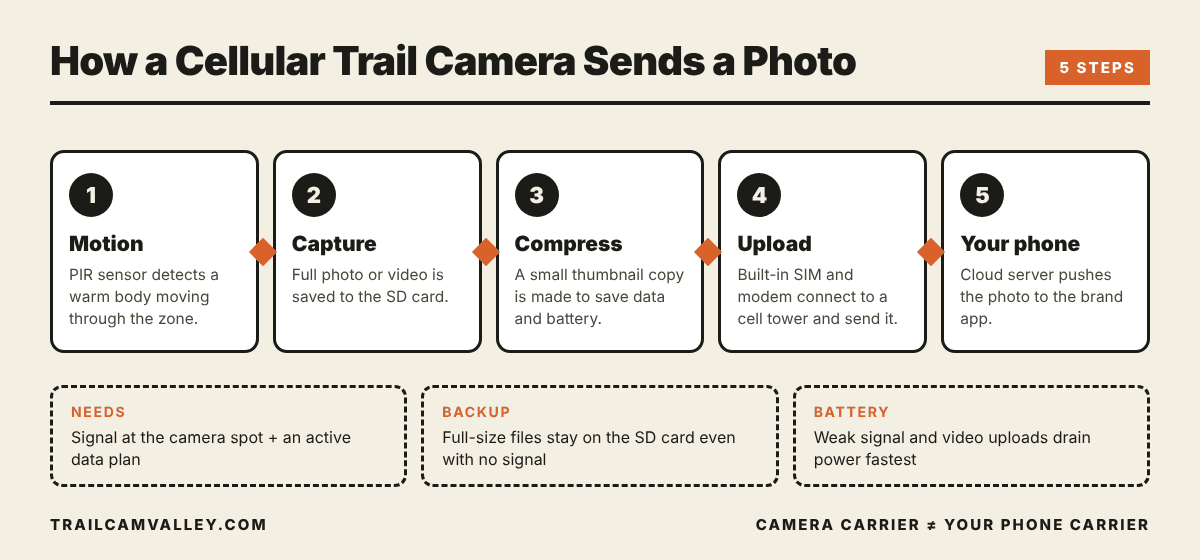
A cellular trail camera works like a motion-triggered camera with a tiny cell phone built in. When it detects movement, it takes a photo or video, saves the full file to its memory card, compresses a smaller preview, and sends that preview over a cellular network to the manufacturer’s cloud server. The server then pushes it to your phone app. Because it uses a mobile network, it needs a SIM card, a usable signal at the camera location, and a data plan.
Step by Step: From Motion to Your Phone
1. The PIR sensor detects heat and motion
Like any trail camera, a cellular model sits in a low-power standby mode until its passive infrared (PIR) sensor notices a warm body moving across its detection zone. If you want the deeper science, our guide on how a trail camera triggers explains how PIR zones, sensitivity, and trigger speed work together.
2. The camera captures and stores the full file
The camera wakes up, takes the photo or clip, and writes the full-resolution file to the SD card. Tactacam’s own explainer on how trail cams work points out that even though images are sent over cellular networks, the camera still stores data on an SD card. That card is your backup and your archive. If you need help choosing one, see our guide to SD cards for trail cameras.
3. It makes a small “thumbnail” copy
Sending a full 20-plus megapixel file over a weak rural signal would drain the battery and burn through your plan. So most cellular cameras compress a low-resolution preview first. GardePro’s beginner guide describes this thumbnail as usually enough to identify a deer or a person. Many apps let you request the full-size or HD version of a specific photo later, often at an extra cost in data or credits.

4. The modem finds a tower and connects
This is the part that makes a cellular camera different. Inside the housing is a cellular modem and a SIM card, the same basic idea as your phone. Most modern cameras ship with a built-in SIM. Tactacam notes that the most advanced models use multi-carrier SIMs that automatically choose the best network, while older deer cams made the owner pick a carrier and insert that carrier’s SIM. Each time the camera sends an image, it has to search for a signal, connect to the network, and upload the data.
One detail surprises a lot of people: the camera’s carrier has nothing to do with your phone’s carrier. Moultrie Mobile makes this point directly in its cellular camera guide: the trail camera network and your cellphone network are not connected and do not have to be the same. A Verizon-based camera can send photos to an AT&T phone without any problem.
5. The photo goes to the cloud, then to your app
The camera does not text you directly. It uploads to the manufacturer’s server, and the server delivers the image to the app on your phone, and sometimes to email. That is why you manage settings, plans, and photo history inside apps like SPYPOINT, Tactacam REVEAL, Moultrie Mobile, or Stealth Cam Command. If you are setting one up for the first time, our walkthrough on how to connect a trail camera to your phone covers activation for the major brands.
Why Cellular Cameras Need a Data Plan
Since the camera is using a mobile network, someone has to pay for the data. That is the data plan. Retailer Scheels puts it simply in its cellular camera overview: because the camera connects to a cellular network, you pay for a data plan to receive the images on your device.
In practice, plans are almost always sold by the camera brand rather than by your phone company, and they are usually measured in photos per month rather than gigabytes. Some brands offer a free tier with a small monthly photo allowance, while unlimited plans cost more. Prices and limits change often, so check the current details in our plan guides:
- SPYPOINT data plans compared
- Moultrie Mobile plans
- Bushnell cellular data plans
- What is the cheapest trail camera plan?
Signal: The Make-or-Break Factor
A cellular camera is only as good as the signal where you hang it. One bar may be enough for thumbnails, but uploads take longer and use more battery. No signal means no transmissions at all, although the camera keeps saving to the SD card.
Before buying, check carrier coverage maps for your exact spot, or better yet, look at the signal on a phone standing where the camera will go. Many apps also show a signal strength reading after activation. Moving a camera a few yards uphill or out of a creek bottom can make a real difference. If you hunt in a former UScellular area, read our update on trail cameras for US Cellular areas.
Battery Use: Why Cellular Models Drain Faster
Every transmission costs power. Searching for a tower, connecting, and pushing data out uses far more energy than simply writing a file to an SD card. Weak signal makes it worse, because the modem works harder and longer. That is why cellular cameras are commonly paired with lithium batteries, external packs, or solar panels.
To stretch battery life, reduce how often the camera checks in, avoid sending video when photos will do, and point the camera away from swaying branches that cause false triggers. Our guides on trail camera batteries and connecting a solar panel go into detail.
Cellular vs Wi-Fi vs Standard Cameras
| Type | How photos reach you | Range | Monthly cost |
|---|---|---|---|
| Cellular | Cell network to cloud to app | Anywhere with signal | Data plan required |
| Wi-Fi / Bluetooth | Direct to phone when you are nearby | Short range | None |
| Standard (non-cellular) | You pull the SD card | Must visit camera | None |
For a full comparison, read Wi-Fi vs cellular trail cameras and our explainer on non-cellular trail cameras. If you already own a standard camera, see whether you can make it cellular with an adapter.
Common Problems and What Causes Them
- Photos stop arriving: usually a lapsed plan, weak signal, dead batteries, or a full or failed SD card.
- Delayed photos: poor signal or a long check-in interval. Some cameras batch uploads to save power.
- Thumbnails only: normal behavior on most plans. Request HD or full-size images individually.
- Battery drains in days: weak signal, video uploads, or constant false triggers.
For brand-specific fixes, see SPYPOINT camera not connecting or the general checklist in how to fix a trail camera.
Quick Facts
- Cellular trail cameras use a SIM card and cellular modem to send images over mobile networks (Tactacam, Moultrie Mobile).
- Most modern models have built-in, multi-carrier SIMs that pick the best available network (Tactacam).
- Cameras usually send a compressed thumbnail first to save battery and data (GardePro).
- The full-resolution file is still saved to the SD card (Tactacam).
- The camera’s carrier does not have to match your phone’s carrier (Moultrie Mobile).
- A data plan is required to receive images (Scheels).
Frequently Asked Questions
Do cellular trail cameras need Wi-Fi?
No. They use cell towers, not Wi-Fi. You need cellular signal at the camera location, not internet access.
Can a cellular trail camera work without a data plan?
It can still take photos and save them to the SD card, but it cannot send anything to your phone without an active plan.
Do I need the same carrier as my phone?
No. The camera’s network and your phone’s network are separate. You can use any phone to view the photos.
How fast do photos arrive?
With good signal, often within a minute or two. Weak signal and long check-in intervals can stretch that to hours.
Can I put my own SIM card in a cellular trail camera?
Most current brand-name cameras use a built-in SIM tied to the brand’s plan. Some budget models accept third-party SIMs, so check the manual.
Do cellular cameras work with no signal?
They keep capturing and storing photos on the SD card, but they will not transmit until they can connect.
Final Thoughts
A cellular trail camera is really three systems in one: a motion camera, a cell modem, and a cloud service. When all three line up, you get near-real-time scouting from anywhere. When one fails, it is almost always signal, power, or the plan. Check those three first, and the camera usually takes care of the rest.
Shopping for one? Start with our guide on how to pick a trail camera and compare plan costs before you buy.