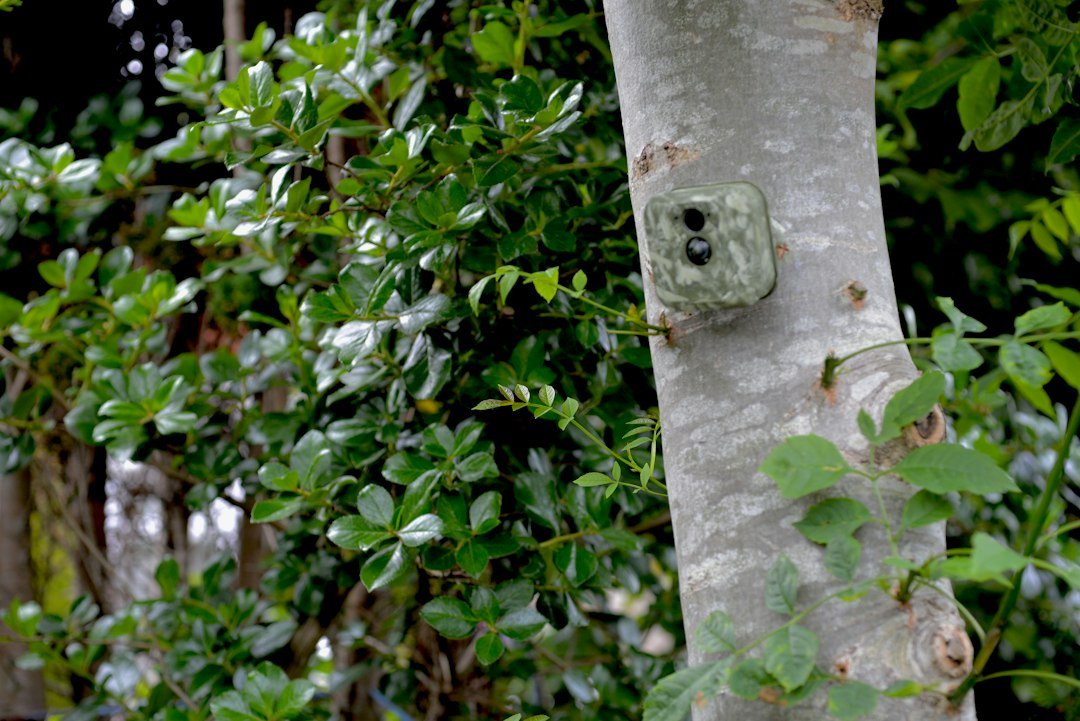
How to find a trail camera: If you are trying to locate your own camera, start with saved GPS waypoints, installation photos and the last known tree or post. Search systematically and check the official cellular app for any supported location features. Not every trail camera has GPS.
How to Find a Trail Camera: Start With the Right Situation
Finding a trail camera can mean locating one you previously installed, recovering a misplaced or stolen camera, or noticing a camera mounted on property where you have a right to be. The safest approach depends on which situation applies. If you own the camera, begin with installation notes, photographs, GPS waypoints, and the last known position. If you encounter an unfamiliar camera, do not remove, damage, or access it without permission. A trail camera can be hidden behind vegetation, mounted above eye level, or attached to a post. Search systematically and stay within areas you are legally allowed to access.
Step 1: Check Your Installation Records
The fastest way to locate your own trail camera is to check records created when it was installed. Search your phone’s map pins, notes, hunting journal, property map, or photos from setup day. A photograph showing the camera and a distinctive tree, fence, or trail intersection can be particularly helpful. If you use multiple cameras, compare serial numbers or labels to your records. Review dates of recent visits to narrow the likely location. If you have no records, write down what you remember: the access route, approximate walking time, nearby landmarks, and which direction the camera faced. Avoid relying only on memory when several locations look similar.
Step 2: Search the Last Known Area Systematically
Return to the last known installation area during daylight and begin with the route you originally used. Walk slowly and look for straps, metal security boxes, mounting brackets, and rectangular camera housings on trees or posts. Check likely viewpoints along game trails, water sources, gates, and field edges. Search one section at a time rather than wandering randomly. If possible, mark the areas already checked on a map so you do not repeat them. Carry a charged phone and tell someone where you are going if searching remote land. Do not enter neighboring property or restricted areas without permission.
Step 3: Look for Mounting Straps and Security Boxes
Camouflage can make a trail camera difficult to notice from the front, but its mounting hardware may be more visible from the side or rear. A strap wrapping around a tree trunk, a small padlock, or a steel cable may stand out against the bark. Some cameras are installed inside metal security boxes that resemble dark rectangular containers. Look carefully at stable trees and posts near the likely recording area. Avoid touching an unfamiliar installation; it may belong to another person or be part of authorized wildlife monitoring. For your own camera, check the mounting hardware before opening it, especially if a branch or loose bracket has shifted.
Step 4: Use a Saved GPS Waypoint
A GPS waypoint recorded during installation is one of the most reliable ways to relocate a camera. Open the waypoint in a mapping or navigation app and follow a safe, legal route to the marked location. Remember that GPS accuracy varies with terrain, canopy cover, device quality, and conditions. A waypoint may place you near the correct tree rather than directly beside it. Once you reach the general area, use your original photographs and landmarks to identify the exact mount. Do not assume the camera itself contains a GPS receiver merely because you used a GPS-enabled phone to record the location.
Can a Cellular Trail Camera Be Tracked?
Some cellular trail camera platforms provide location-related features, but not every cellular camera has GPS hardware or a live tracking function. Cellular connectivity means the camera can transmit data over a supported mobile network; it does not automatically reveal its physical position. A companion app may show a manually assigned map pin or a location entered during setup. That is not proof of the camera’s current position if it has been moved. Check the exact model and app documentation for verified GPS, theft-recovery, or location features. Do not assume a camera can be tracked from its SIM card or serial number without the provider’s assistance.
How to Check Your Camera’s App
If you own a compatible cellular camera, sign in to its official companion app and open the camera’s details. Look for its last communication time, status, battery information, signal level, and any location field the app provides. A recent image may show the camera is still operating, but it does not necessarily identify its exact location. Compare the background of transmitted photos with known landmarks. If the app displays a map pin, confirm whether it is a true device-derived position or one you previously entered. Avoid sharing account credentials with anyone offering an unofficial tracking service. Contact the manufacturer for supported recovery features.
Can You Find a Trail Camera With Bluetooth or Wi-Fi?
A few cameras have short-range wireless features for setup or image transfer, but Bluetooth and Wi-Fi are not universal trail camera capabilities. Even when supported, the connection range can be limited by vegetation, terrain, and the device design. A normal home Wi-Fi scanner will not reliably locate an ordinary SD-card trail camera that has no active wireless transmitter. Likewise, a camera may disable its wireless connection to save power. Consult your exact model manual before trying to locate it through an app. Our trail camera Wi-Fi guide explains the different connection types.
What If Your Trail Camera Was Stolen?
If you believe your camera was stolen, record the last known location, installation date, serial number, purchase receipt, and any available images. Check whether a cellular model has recently transmitted a photo, but do not assume that provides a live location. Notify the property owner or land manager and follow local reporting procedures. Do not confront a suspected thief or enter private property to retrieve equipment. Ask the camera manufacturer whether the model supports account-level security or theft-related assistance. If you suspect unauthorized access to the account, change its password and review connected devices. A police report may be appropriate depending on the circumstances.
How to Find a Camera That Fell From Its Mount
A loose strap, broken bracket, falling branch, or animal contact can dislodge a camera. If your unit is missing from its tree, inspect the ground immediately below and downhill from the original mount. Look under leaves, fallen branches, and nearby vegetation without disturbing wildlife habitat unnecessarily. A security cable may still be attached to the tree even if the camera body has shifted. If you find the camera wet or damaged, do not immediately power it on. Follow the manufacturer’s guidance for inspecting moisture damage. Photograph the original mounting area before moving anything if you need to document how the equipment failed.
How to Find a Trail Camera in the Woods
Woodland searches are easiest when you break the terrain into manageable sections. Begin with obvious travel corridors such as trails, creek crossings, and gaps between trees where a camera might have been aimed. Look for straight-edged shapes, straps, and hardware rather than expecting the camera’s camouflage pattern to be visible. Search in daylight with enough time to return safely. A compass, offline map, and marked waypoints can help prevent disorientation. Wear appropriate footwear and respect hunting activity, wildlife, and local access rules. If searching for your own lost camera, compare the location with previous setup photographs to narrow the area.
Where Are Trail Cameras Usually Mounted?
Trail cameras are commonly installed on trees, fence posts, brackets, and other stable supports overlooking animal trails, feeding areas, gates, or property entrances. The height varies by purpose and terrain. A camera used for deer monitoring may be near the animal’s body height, while one used for property monitoring may be higher and angled downward. Some owners place cameras in protective steel boxes or use cable locks. Knowing these common arrangements can help you relocate your own equipment, but it does not authorize you to search or tamper with someone else’s devices. Read our mounting height guide.
How to Identify a Trail Camera on Your Property
If you notice an unfamiliar object on land you own or manage, examine it visually from a safe distance. Trail cameras often have a lens, motion sensor window, infrared LED array, and a strap or bracket. Some look like small camouflaged boxes, while others are more compact. Avoid opening the housing or removing the SD card; the device may belong to an authorized survey, contractor, or neighboring land manager. Check with anyone who has permission to work on the property. If you have concerns about unauthorized surveillance, document the location and seek appropriate local advice. Do not destroy equipment or attempt to access private recordings.
Can a Phone Detect a Hidden Trail Camera?
There is no dependable phone app that detects every hidden trail camera. Many non-cellular cameras are passive while waiting for motion and do not broadcast Wi-Fi or Bluetooth signals. A phone’s flashlight might help you notice a lens reflection in some circumstances, but reflections are not reliable proof of a camera. Some specialized electronic detectors can identify certain active transmissions, yet they can miss devices and produce false positives. Avoid claims that a generic phone app can locate all cameras through infrared or magnetic sensors. For a camera you own, saved waypoints, setup photos, and physical search are usually more dependable than detection apps.
Do Trail Cameras Emit Visible Light at Night?
Many trail cameras use infrared LEDs at night. Low-glow models may produce a faint red glow during a trigger, while no-glow models are designed to be less noticeable. The LEDs are usually not on continuously, so waiting for a visible flash is not a reliable way to locate a camera. The motion sensor itself is passive and does not project a visible beam. Do not shine powerful lights toward unknown equipment or interfere with monitoring. If you are testing your own camera, use a controlled nighttime walk test and verify the saved photographs. See our night vision explanation.
Can You Find a Trail Camera by Its Serial Number?
A serial number helps identify ownership, warranty records, and a particular model, but it is not a universal location tracker. Keep a photograph of the label and proof of purchase before installing your camera. If the device is lost or stolen, the manufacturer may be able to advise on supported account features or documentation, but there is no guarantee that a serial number can reveal its whereabouts. Do not pay third parties promising precise GPS tracking from a serial number alone without verifying their legitimacy. Use the serial number in any appropriate incident report and when communicating with official customer support.
How to Prevent Losing Your Trail Camera Again
Record a GPS waypoint when installing each camera and take two photographs: one showing the mounted device and another showing the surrounding landmark. Give each camera a unique name that matches your notes or app account. Maintain a simple spreadsheet with model, serial number, location, installation date, and next check date. Consider a compatible lock and security box where theft is a concern. Revisit mounts periodically to inspect straps and brackets. If a camera is moved, update the waypoint immediately. Our locking guide explains ways to reduce unauthorized removal.
How Often Should You Check a Trail Camera?
Check frequency depends on battery life, storage capacity, wildlife disturbance, weather, and whether the camera can transmit images remotely. Repeated visits can disrupt animals and create unnecessary travel, while very long gaps increase the risk of dead batteries or missed equipment damage. For a new installation, an early follow-up can confirm that the camera remains attached and aimed correctly. For established locations, use a schedule based on the model and monitoring goals. Keep a record of every visit, including any relocation. Our camera checking guide provides practical considerations.
What Not to Do When You Find Someone Else’s Camera
Do not remove the SD card, view private recordings, change settings, cut the mounting cable, or take the device. Ownership and placement rules vary, and even an unauthorized installation does not automatically give you permission to damage it. If a camera appears to violate privacy or land-use rules, document the location without interfering and contact the property owner, land manager, or appropriate authority. Avoid confronting strangers in isolated areas. If you need to protect your privacy, seek lawful guidance rather than attempting to disable the camera. This distinction is important when searching for cameras on shared or public land.
Frequently Asked Questions
How do I find my lost trail camera? Check saved waypoints, installation photos, landmarks, and the last known tree or post. Can a cellular trail camera be GPS tracked? Only if its model and service provide a verified location feature. Can my phone find a trail camera? Not reliably; most non-cellular models do not broadcast a detectable signal. Where should I look first? Start at the last recorded installation site and search systematically. Can I identify a camera by serial number? It identifies the unit but does not normally provide location. What if I find a stranger’s camera? Do not tamper with it; contact the responsible land manager.
Final Checklist for Finding Your Camera
Begin with your own records, not guesses about hidden tracking technology. Verify the last known installation point, use a GPS waypoint if available, compare old photographs with nearby landmarks, and search legally accessible areas in daylight. Check the official cellular app only for features supported by your exact model. If theft is suspected, document the incident and contact the appropriate authority rather than confronting anyone. For future deployments, maintain location records and use secure mounting hardware. You can also review camera concealment practices to understand why your own unit may be difficult to spot.
As an Amazon Associate, I earn from Qualifying Purchases.