
Are you ready to take your photography and videography to the next level? A wireless monitor for your camera could be the game-changer you’ve been searching for.
Imagine effortlessly framing your shots from a distance, monitoring your footage in real-time, and ensuring every detail is just right—all without the hassle of tangled cords. We’ll dive deep into the world of wireless monitors, exploring their features, benefits, and how they can transform your creative process.
Whether you’re a professional filmmaker or a hobbyist, understanding how to effectively use a wireless monitor can elevate your work and streamline your shooting experience. Keep reading to discover why this tool is essential for anyone serious about capturing stunning visuals!
What Is A Wireless Monitor For Cameras?
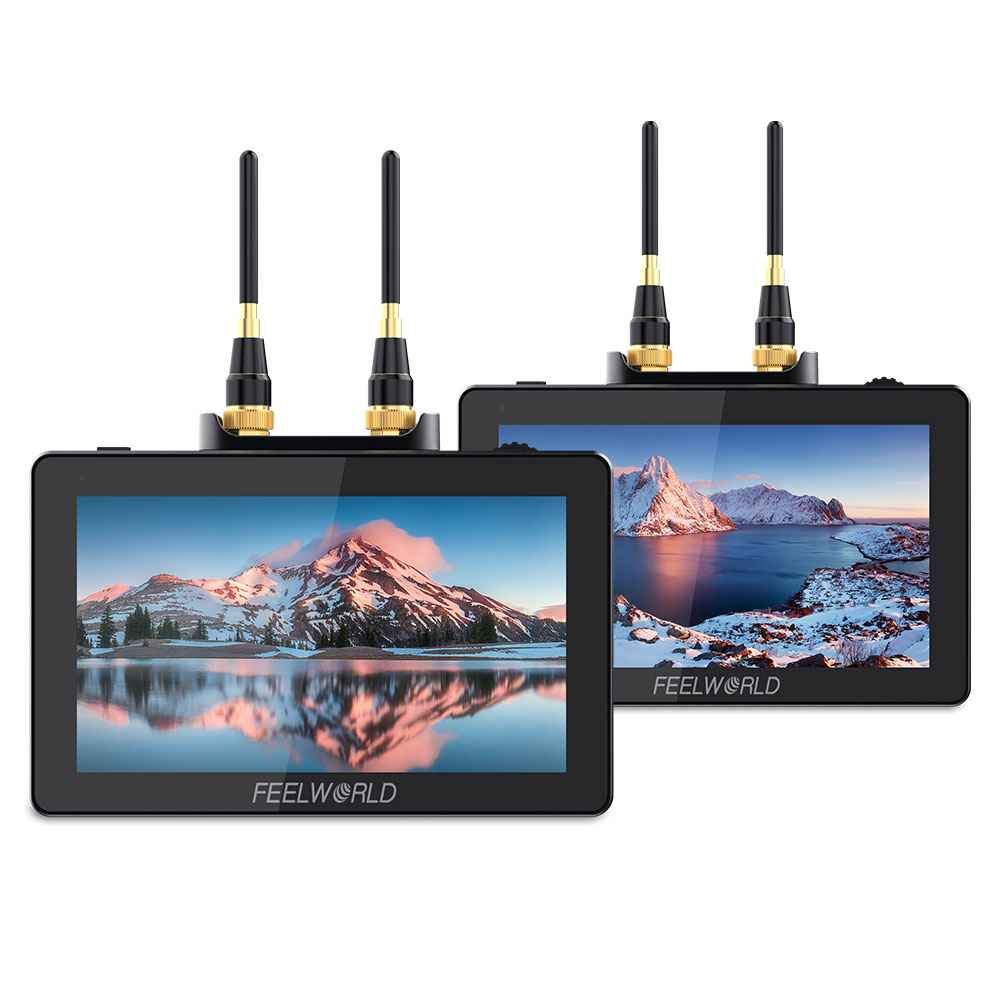
A wireless monitor for cameras is a device that allows you to view your camera’s feed without being physically connected to it. This technology is especially useful for photographers and videographers who need to monitor their shots from a distance. Imagine shooting a wedding or a nature scene where moving around is essential; having a wireless monitor can make all the difference.
Understanding The Basics
Wireless monitors connect to your camera using Wi-Fi or other wireless technology. They display what your camera sees in real-time. This allows you to adjust settings, frame your shot, and ensure everything looks perfect without being tethered to your equipment.
Benefits Of Using A Wireless Monitor
- Flexibility: You can move freely around the set or location.
- Enhanced Collaboration: Directors and clients can easily view the shot without crowding around the camera.
- Improved Focus: You can focus on your subject without constantly checking the camera.
Common Uses Of Wireless Monitors
Many professionals use wireless monitors for various applications:
- Filmmaking: Directors can keep an eye on shots from a distance.
- Live Events: Capture moments without being in the way.
- Photography: Ensure the perfect composition from various angles.
Have you ever found yourself struggling to see the screen of your camera while trying to capture that perfect moment? A wireless monitor can solve that problem efficiently.
Choosing The Right Wireless Monitor
When selecting a wireless monitor, consider factors such as:
- Resolution: Higher resolution provides clearer images.
- Battery Life: Longer battery life means less downtime.
- Range: Ensure it can connect from the distance you need.
Each of these aspects can significantly affect your shooting experience. You want a reliable tool that enhances your creativity, not hinders it.
Credit: feelworld.ltd
Key Features To Look For
Choosing the right wireless monitor for your camera can enhance your shooting experience. Several key features play a vital role in this decision. Understanding these features helps you make an informed choice.
Resolution And Display Quality
High resolution is essential for clear images. Look for monitors with at least 1080p resolution. A good display quality enhances color accuracy and contrast. This feature makes it easier to frame shots accurately. Touchscreen capabilities can offer intuitive controls.
Latency And Signal Range
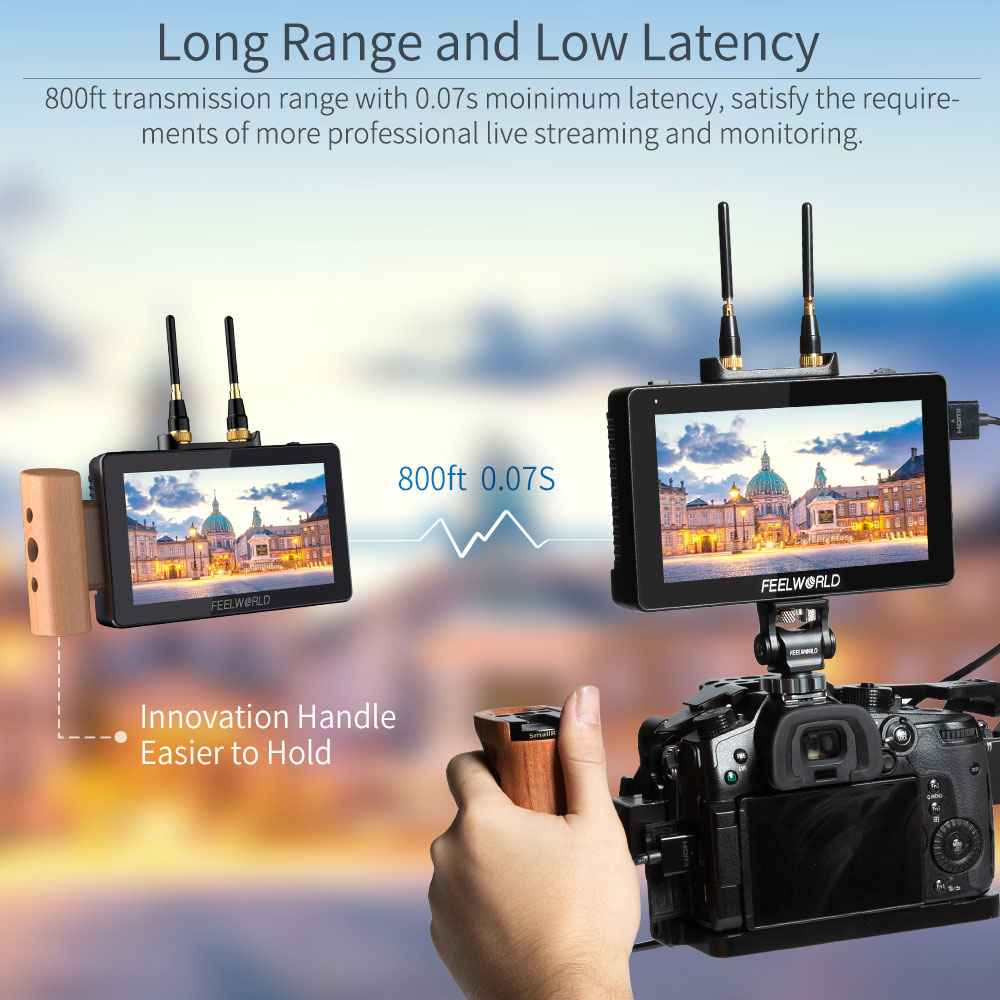
Low latency is crucial for real-time monitoring. A delay can affect your shooting precision. Check the signal range to ensure it meets your needs. A range of 100 feet or more is ideal for most situations. Strong signal strength prevents interruptions during shoots.
Battery Life And Portability
Long battery life allows for extended shooting sessions. Look for monitors that offer at least 3 hours of usage. Lightweight and compact designs enhance portability. This feature is important for on-the-go filming. Consider monitors with battery options for flexibility.
Build Quality And Durability
Durable construction protects against accidental drops. Choose monitors made from high-quality materials. Weather-resistant features are beneficial for outdoor shoots. A solid build ensures longevity in various conditions. Check for warranties that cover manufacturing defects.
Advantages Of Using A Wireless Monitor
Using a wireless monitor for your camera can transform your shooting experience. The advantages of wireless technology extend beyond mere convenience. This innovation allows for greater freedom and creativity on set, making it an essential tool for filmmakers and content creators.
Enhanced Flexibility In Shooting Angles
A wireless monitor offers you the ability to position your camera and monitor independently. This means you can explore unique angles that were once constrained by cables. Imagine capturing a breathtaking shot from an elevated position, while still having the monitor in your hands to see what the camera sees.
During a recent shoot, I discovered how freeing it felt to move around without worrying about tripping over cables. I could direct the scene while keeping an eye on the frame. This flexibility not only enhances creativity but also allows for more dynamic storytelling.
Reducing Cable Clutter On Set
Cables can create chaos on a film set. They can trip up crew members, cause equipment damage, and disrupt the flow of production. By using a wireless monitor, you eliminate much of this clutter, creating a safer and more organized environment.
Think about it: a clean workspace means less stress and better focus. With fewer cables to manage, your team can concentrate on what truly matters—capturing the perfect shot. Plus, you’ll spend less time untangling cords and more time being creative.
Improved Workflow For Filmmakers
A wireless monitor streamlines the filmmaking process. You can easily relay information to your crew without needing to shout across the set. This leads to quicker adjustments and more efficient communication, ultimately speeding up production.
In one project, we saved valuable time by using a wireless monitor to preview shots in real time. Instead of running back and forth to the camera, I could make immediate adjustments based on what I saw. This not only improved our workflow but also boosted the overall quality of our project.
Have you experienced the benefits of a wireless monitor? Consider how it can enhance your next shoot, both creatively and logistically.
Top Wireless Monitors On The Market
Finding the right wireless monitor for your camera can elevate your shooting experience. With various options available, choosing the best one can feel overwhelming. Here’s a breakdown of the top wireless monitors on the market, tailored to suit different budgets and needs.
Budget-friendly Options
If you’re just starting out or have a tight budget, there are excellent wireless monitors that won’t break the bank. Consider the SmallRig Wireless Video Monitor, priced at around $64.99. It offers solid performance for casual shooting and is lightweight, making it easy to carry.
- Neewer Wireless Monitor: Approximately $209.99, this monitor balances quality and affordability.
- Feelworld FW568: Priced at $74.99, it features a 5.5-inch screen and built-in battery for convenience.
These options are great for beginners or hobbyists looking to enhance their camera setup without spending too much. Have you ever felt limited by your camera’s built-in screen? A good wireless monitor can change that.
Mid-range Choices
If you’re ready to invest a bit more, mid-range monitors offer enhanced features and better image quality. The Atomos Shinobi GO HDR Monitor is a popular choice at about $249. This model boasts HDR capabilities, providing a clearer picture in various lighting conditions.
- Viltrox DC-70II: For around $278, this monitor includes a 7-inch display and multiple input options, making it versatile.
- Neewer 7-Inch Wireless Monitor: At $209.99, it offers a great mix of features and performance.
These mid-range options cater to serious enthusiasts and semi-professionals. Have you thought about how a better monitor could enhance your filming workflow?
High-end Professional Monitors
SmallHD 702 Touch is a top contender, priced at around $4,699. Its intuitive touchscreen interface and superior image quality set it apart from the rest.
- Atomos Ninja V: At $599, this monitor offers both monitoring and recording capabilities, perfect for professionals on the go.
- Tractormat Wireless Multi LCD Screen: Priced at $887.97, it provides a multi-screen setup ideal for complex shoots.
High-end monitors give you the tools you need for professional-quality work. Think about the impact a top-tier monitor could have on your projects. Are you ready to take your filming to the next level?
How To Choose The Right Wireless Monitor
Selecting the right wireless monitor for your camera can feel overwhelming. With so many options, understanding your needs is vital. A good monitor enhances your shooting experience. It helps you achieve your creative vision. Here’s how to make the best choice.
Assessing Your Filming Needs
Start by thinking about your filming style. Are you shooting indoors or outdoors? Consider lighting conditions. Monitors with higher brightness are ideal for bright settings. Think about the types of shots you often take. Will you need a portable monitor? Choose a lightweight option for easy transport.
Compatibility With Camera Systems
Check if the monitor works with your camera. Different cameras have different connection types. Make sure your monitor supports HDMI or SDI connections. Look for compatibility with your specific camera model. This ensures seamless communication between devices.
Considering Pricing And Value
Set a budget before shopping for a monitor. Prices vary widely based on features and brand. Find a monitor that fits your budget and needs. Consider the long-term value of your purchase. Higher-priced monitors may offer better durability and features.

Credit: www.amazon.com
Common Challenges And How To Overcome Them
Using a wireless monitor for your camera can enhance your filming experience, but it also presents some common challenges. Understanding these obstacles and how to tackle them can significantly improve your workflow. Let’s discuss some of the most frequent issues you might encounter and practical solutions to overcome them.
Signal Interference Issues
Signal interference is a major challenge when using wireless monitors. Your signal can be disrupted by various factors, such as physical barriers, other electronic devices, or even Wi-Fi networks. I once struggled with signal dropout during a crucial shoot because of nearby construction equipment.
To overcome this, try to:
- Position your monitor and camera with a clear line of sight.
- Avoid crowded areas with multiple wireless devices.
- Consider using a frequency scanner to choose the best available channel.
Testing your setup before the main event can save you from unexpected interruptions. Have you ever faced similar issues during a shoot?
Managing Battery Life
Battery life is another concern that can catch you off guard. Wireless monitors often consume more power than you might expect. During one long shoot, my monitor died just as I was capturing a pivotal scene.
To extend battery life, you can:
- Use high-capacity external batteries.
- Adjust brightness settings to conserve power.
- Keep the monitor in power-saving mode when not in use.
Planning for battery management not only keeps your equipment running but also ensures you don’t miss important moments. What strategies do you use to keep your devices charged during shoots?
Dealing With Latency
Latency can be a frustrating issue, particularly for live events or fast-paced filming. A noticeable delay between what you see on the monitor and what the camera captures can impact your performance. I experienced this firsthand during a live stream, where the delay caused me to miss key actions.
To minimize latency, consider these options:
- Choose a high-quality monitor known for low latency.
- Use direct HDMI connections when possible.
- Keep your monitor and camera firmware updated for optimal performance.
Reducing latency can drastically improve your shooting experience. Have you found any effective solutions to combat latency in your setups?
Tips For Maximizing Your Wireless Monitor
Using a wireless monitor for your camera can greatly improve your filming experience. To get the most from your device, follow these tips. They will help enhance performance and usability. Simple adjustments can lead to better results.
Optimizing Settings For Best Performance
Adjust the brightness and contrast for clear visibility. Set the resolution to match your camera’s output. This ensures sharp images and smooth video. Use the monitor’s built-in features to reduce latency. Always check for firmware updates to improve performance.
Switch to the best wireless channel to avoid interference. Monitor the battery level and keep it charged. This prevents unexpected shutdowns during shoots. Use the focus assist feature for precise focusing. This adds clarity to your shots.
Proper Maintenance And Care
Keep your monitor clean and dust-free. Use a soft microfiber cloth for the screen. Avoid using harsh chemicals that could damage it. Store the monitor in a protective case when not in use. This prevents scratches and other damage.
Regularly check cables and connectors for wear. Replace any damaged parts immediately. This ensures reliable connections during shoots. Avoid exposing the monitor to extreme temperatures. This can harm the internal components.
Using Accessories For Enhanced Utility
Consider using a sunshade to reduce glare outdoors. This improves visibility in bright conditions. A battery grip can extend usage time significantly. Use a tripod mount for stable shots. This enhances your filming quality.
External speakers can improve audio monitoring. Use HDMI cables for better video quality. A carrying case makes transport easier and safer. Accessories can greatly enhance your shooting experience.
Future Trends In Wireless Camera Monitors
Wireless camera monitors are evolving quickly. New technology is changing how we capture and view images. The future holds exciting advancements that will enhance user experience. Let’s explore some key trends in this space.
Advancements In Display Technology
Display technology continues to improve. Monitors will feature higher resolutions and brighter screens. Expect to see OLED and Mini-LED options. These provide better color accuracy and contrast. Users will enjoy a more immersive viewing experience.
Touchscreen interfaces will become standard. This allows for easier navigation and control. Expect faster refresh rates as well. This enhances real-time viewing, especially during fast action scenes.
Integration With Smart Devices
Wireless camera monitors will connect seamlessly with smart devices. Integration with smartphones and tablets will simplify control. Users can adjust settings and view footage remotely. This connectivity will streamline workflows for creators.
Smart features will include cloud storage options. This allows for easy access to footage from anywhere. Future monitors may support voice commands too. This will enhance usability and convenience.
Increased Accessibility For Creators
As technology advances, prices are expected to drop. More creators will gain access to quality monitors. This opens opportunities for independent filmmakers and photographers. Affordable options will encourage creativity and innovation.
Educational resources will increase as well. Tutorials and guides will help users maximize their equipment. More people will explore the world of content creation.
Credit: feelworld.ltd
Frequently Asked Questions
Is There Such A Thing As A Wireless Monitor?
Yes, wireless monitors exist. They connect to devices without cables, using Wi-Fi or Bluetooth technology. These monitors are popular for photography, gaming, and presentations, offering flexibility and portability. Various brands and models are available, catering to different needs and budgets.
Can You Connect A Camera To A Monitor?
Yes, you can connect a camera to a monitor. Use HDMI or SDI cables for wired connections. Wireless options are also available for more flexibility. Ensure your camera and monitor support compatible connections for optimal performance.
Is There A Way To Connect To A Monitor Wirelessly?
Yes, you can connect to a monitor wirelessly using technologies like Miracast, Chromecast, or dedicated wireless HDMI transmitters. These options allow streaming content without physical cables, enhancing convenience and flexibility. Make sure your devices support the chosen wireless technology for seamless connection.
What Kind Of Monitor Should I Get For Security Cameras?
Choose a monitor with high resolution for clear images. Look for at least 1080p for detailed visuals. Ensure it has multiple input options for versatility. A larger screen size enhances visibility. Consider a monitor with good brightness and contrast for outdoor use.
A dedicated security monitor often provides the best performance.
Conclusion
A wireless monitor for your camera can make a big difference. It offers freedom to move without being tied down. Clear images and easy setup enhance your shooting experience. Choose the right monitor based on your needs. Consider factors like battery life and range.
Investing in a quality wireless monitor improves your creativity. This tool helps capture better footage and simplifies your workflow. Explore your options and find the perfect fit for your camera gear. Enjoy the benefits of a wireless setup for your next project.
As an Amazon Associate, I earn from Qualifying Purchases.